

You want your online store to stand out and grow fast. With ai copilot, you can boost sales, save time, and keep your customers happy. Tools like product comparison, review summarization, and Copilot Checkout help you guide shoppers and make smarter decisions. Many ecommerce brands see big results—like a 22% jump in average order value and a 15% rise in customer satisfaction. Take a look at the chart below to see how ai and copilot features deliver real improvements.
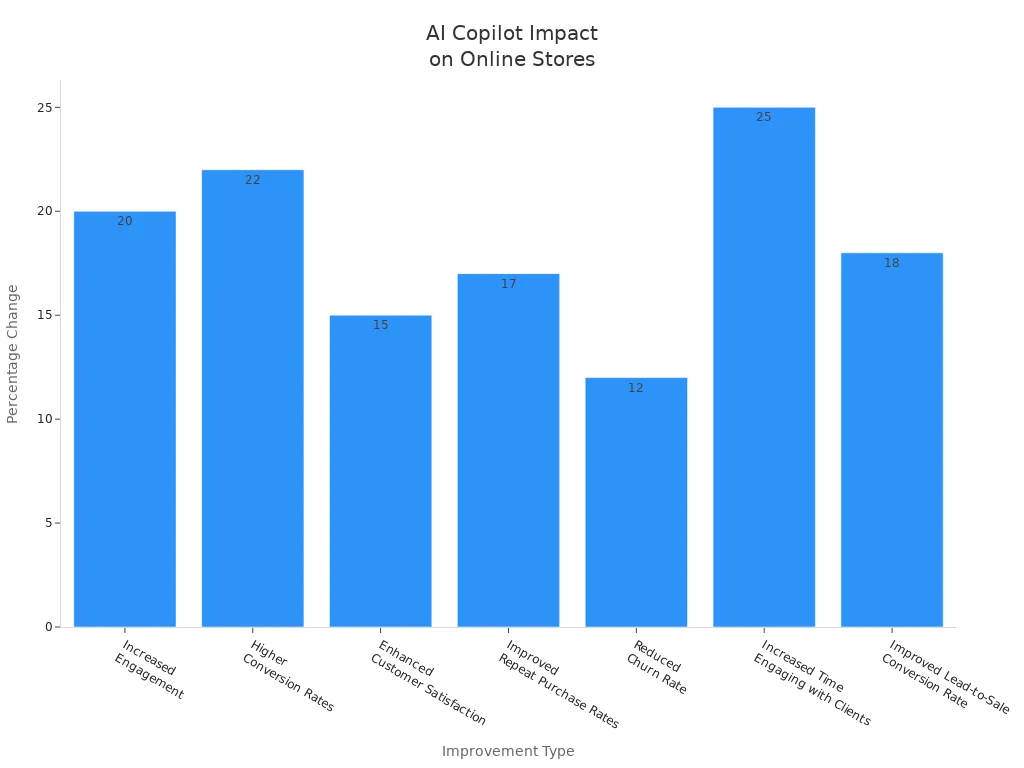
Key Benefits of AI Copilot
Boosting Sales with AI
You want your store to grow. AI copilot helps you do just that. It brings together sales, operations, and content data so you can see everything in one place. You get clear insights and smart recommendations that help you spot sales drops and fix gaps fast. The copilot automates tasks like catalog cleanup and profit recovery. That means you spend less time on manual work and more time on growing your business.
Take a look at how copilot drives sales in ecommerce:
| Sales Metric | Improvement Description |
|---|---|
| Unified Performance Data | Copilot unifies sales, operations, content, and retail media data into one platform, enhancing visibility and decision-making. |
| Actionable Insights | The AI provides prioritized recommendations to address sales drops and forecast gaps, leading to better performance outcomes. |
| Automation of Workflows | Automates tasks like catalog cleanup and profit recovery, allowing teams to focus on strategic growth rather than manual processes. |
You can see real results in fashion stores. Many brands report a jump in conversions after using copilot features like product comparison and review summarization. High-intent shoppers find what they want faster, which leads to more sales. Copilot also helps you track prices and narrow options, making the shopping journey smoother and more intuitive.
Streamlining Store Operations
Running an ecommerce store takes a lot of work. Copilot makes it easier. You can automate inventory management, schedule employees, and optimize supply chains. The ai predicts demand, so you avoid overstocking or running out of popular items. It also automates reorder processes and reduces waste, which is great for stores selling perishable goods.
Here’s how copilot streamlines operations:
| Operational Task | Key Benefits |
|---|---|
| Efficient Inventory Management | Demand forecasting, automated replenishment, and waste reduction. |
| Personalized Customer Experiences | Tailored product suggestions, targeted marketing campaigns, and enhanced customer service. |
| Streamlined Supply Chain Management | Supplier collaboration, logistics optimization, and risk management. |
| Workforce Management and Productivity | Scheduling optimization, performance insights, and personalized training programs. |
You can focus on high-impact activities instead of routine tasks. Copilot helps you roll out new features quickly, keeping your store ahead of market changes. Fashion retailers use copilot to manage seasonal inventory and launch new collections without delays. The ai also improves collaboration among teams, especially when you have employees in different locations.
Personalizing Customer Experience
You want every shopper to feel special. Copilot makes that possible. The ai acts like a digital personal assistant, chatting with customers and guiding them through your store. It gives tailored product recommendations based on their profiles and your catalog. Shoppers get relevant options, which reduces scroll fatigue and creates an intuitive shopping experience.
Here’s what copilot does for personalization:
- Engages customers in a conversational way.
- Curates relevant product selections to match shopper preferences.
- Shares data-driven insights, like popular choices and high ratings, to build confidence.
- Understands customer intent and asks clarifying questions to refine suggestions.
- Mimics in-store staff expertise for a personalized shopping journey.
- Integrates subagents to enhance the overall experience.
Personalization drives satisfaction and retention. AI-powered recommendation systems help shoppers make decisions faster, which boosts conversions. Shopify merchants using smart plugins see customer retention increase by over 30%. Amazon’s personalized product recommendations account for up to 35% of its revenue. Companies that personalize at scale can achieve a 5-15% increase in revenue and a 10-30% improvement in marketing efficiency.
Fashion stores use copilot to create unique experiences for every shopper. The ai offers instant support, analyzes customer sentiment, and helps you respond quickly to feedback. You build loyalty and keep customers coming back for more.
Tip: Use copilot to personalize offers and messages. You can turn first-time visitors into loyal fans with the right approach.
AI Shopping Assistant Tips

Product Comparison Features
You want your customers to make smart choices. An ai shopping assistant helps by comparing products quickly and clearly. These tools use ai to scan product data, reviews, and features. They create easy-to-read charts that show the strengths and weaknesses of each item. Your shoppers can see which product fits their needs and budget.
Here’s how you can use product comparison features to guide your customers:
- Show side-by-side comparisons of similar products.
- Highlight key differences, like price, ratings, and features.
- Use interactive guidance to help shoppers filter options based on what matters most to them.
Many brands see big results with these tools. For example:
- Nosto clients saw a 22.66% increase in conversion rates and a 14.7% boost in average order value with personalized recommendations.
- Urban Outfitters used Dynamic Yield and increased sales by 15%.
- Algolia Recommend uses natural language processing and collaborative filtering to deliver instant, relevant search results.
When you use ai-powered guidance, you save time for both your team and your customers. Shoppers trust these tools. Almost half of buyers believe ai gives more honest advice than friends. By offering clear, unbiased comparisons, you help customers feel confident and ready to buy.
Tip: Add comparison charts to your product pages. This makes it easy for shoppers to decide and keeps them on your site longer.
Review Summarization Tools
Reading hundreds of reviews can overwhelm anyone. An ai shopping assistant solves this by summarizing reviews into short, helpful highlights. You can use these summaries to show what people love (or dislike) about a product. This builds trust and speeds up the decision process.
Let’s look at how top review summarization tools work:
| Feature | Description |
|---|---|
| Built on Massive Data | Yotpo’s ai uses insights from 15,000 brands and 300 million reviews. |
| Part of a Larger AI Engine | Smart Prompts help collect more impactful reviews. |
| Designed for Conversion | The summary widget is mobile-first, customizable, and grabs attention right away. |
| Provides Deeper Brand Insights | The dashboard gives a health score for reviews and offers actionable tips. |
Review summaries help your customers in many ways:
| Benefit/Concern | Description |
|---|---|
| Streamlining the customer experience | Customers quickly see common themes about a product’s strengths and weaknesses. |
| Increasing conversions | Highlighting positive points can boost confidence and sales. |
| Keeping customers’ attention on the site | Summaries keep shoppers from leaving to find more reviews elsewhere. |
| Concerns about accuracy | Sometimes, ai may misinterpret feedback, so check summaries for errors. |
| Risk of misleading feedback | Make sure the summaries reflect real customer opinions to keep trust high. |
You want to build trust. AI-generated summaries give shoppers a quick overview of what matters. This keeps them engaged and helps them decide faster. Just remember to review the summaries for accuracy. Even small mistakes can hurt trust.
Note: Place review summaries near the “Add to Cart” button. This can increase conversions and keep shoppers focused.
Price Tracking Automation
Staying competitive means knowing when prices change. An ai shopping assistant can track prices for you. It watches your competitors and alerts you when they make a move. You can react fast and keep your prices just right.
Here’s how to set up price tracking automation:
- Set clear goals. Decide if you want higher margins, better market position, or both.
- Pick reliable data sources. Use official sites and avoid old or incorrect data.
- Let ai suggest which data to track.
- Automate the process. Schedule regular checks and get alerts for price changes.
- Check your data often. Make sure it’s accurate and secure.
- Use the insights. Adjust your prices and strategies based on what you learn.
With automated price tracking, you react to market changes in minutes. This helps you avoid losing sales to competitors. Real-time data lets you protect your profit margins and avoid costly mistakes. AI agents can even adjust prices based on customer behavior, keeping your store competitive.
Tip: Use ai copilot to set up dynamic pricing. This keeps your store ahead of the competition and helps you win more sales.
Why Use an AI Shopping Assistant?
An ai shopping assistant does more than just answer questions. It guides your customers, suggests products, and nurtures leads. You give shoppers a smooth, personal experience. You also save time and make better decisions for your business.
When you combine ai, ai copilot, and ai-powered guidance, you create a store that feels smart and helpful. Customers notice the difference. They trust your store and come back for more.
Copilot Checkout Strategies
AI Copilot Checkout Integration
You want your checkout process to feel smooth and modern. Copilot checkout makes this possible by connecting your store with powerful tools. You can follow these steps to get started:
| Step | Description |
|---|---|
| 1 | Join Microsoft Merchant Center (MMC) to boost your product feeds for better copilot results. |
| 2 | Enable copilot checkout for your ecommerce platform. |
| 3 | Integrate brand agents, especially if you use Shopify. |
Copilot checkout works with PayPal, Shopify, and Stripe. If you run a Shopify store, you get copilot checkout automatically. You do not need to apply or wait. This means you can start helping shoppers right away.
Reducing Cart Abandonment
Cart abandonment can hurt your sales. In 2023, rates hit 70%, the highest in years. Copilot checkout uses ai to fight this problem. Real-time engagement helps you respond to shopper hesitation. You can send instant messages, offer discounts, or answer questions before shoppers leave. Many stores see cart abandonment drop by 15% to 40% after adding copilot checkout.
Try these tips to keep carts full:
- Respond fast with personal follow-ups while shoppers still want to buy.
- Use ai chatbots to offer deals or free shipping when someone hesitates.
- Make checkout simple and clear. Remove extra steps and show all costs up front.
- Use real-time data to send recovery messages by email, SMS, or on your site.
- Test and improve your messages with ai insights.
If you recover just 30% of lost carts, you could add $45,000 a year for a store making $20,000 a month.
Personalizing Offers
Copilot checkout lets you make every offer feel special. Ai personalizes recommendations based on what shoppers want and how much they want to spend. You can show bundles, cross-sell, or suggest upgrades right in the checkout flow. This boosts average order value by 10-15%. Some stores see conversion rates nearly triple with personalized offers.
| Feature | Description |
|---|---|
| Personalized Recommendations | Short, actionable lists based on shopper needs and budget. |
| In-Chat Checkout | Shoppers can buy without leaving the chat, making it easy. |
| Integrated Price Intelligence | Shows price history and tracks deals, building trust. |
| Personalization Potential | Every shopper gets a unique experience that feels just right. |
Tip: Use copilot checkout to suggest bundles or upgrades. Shoppers love feeling understood, and your sales will grow.
AI Content Creation for Stores

Automated Product Descriptions
You want your product pages to shine. With copilot, you can create unique and catchy descriptions in seconds. AI tools help you write thousands of product listings fast, so you never have to worry about running out of time or ideas. These tools keep your brand voice steady and make sure every product stands out.
Here’s a quick look at some top AI tools for product descriptions:
| AI Tool | Key Features | Notable Clients |
|---|---|---|
| Jasper AI | Templates, tone options, Shopify integration | Amazon sellers, Canva |
| Copy.ai | One-click generator, SEO, multi-language | eBay sellers, D2C brands |
| TextCortex AI | Context-based writing, audits | Zalando, luxury brands |
| Hypotenuse AI | Image-to-text, SEO, style customization | Etsy sellers, furniture |
To get the best results: 1. Research keywords that shoppers use. 2. Add those keywords to your titles and descriptions. 3. Write a fresh description for each product. 4. Keep it short and easy to read. 5. Use structured data to help search engines. 6. Make sure your pages look good on phones.
AI descriptions boost your store’s SEO and help customers find what they want. You keep your fashion catalog up to date and engaging.
Marketing Content Generation
You need great marketing to grow your store. Copilot makes this easy. AI can write emails, social posts, and even blog articles that match your brand style. Tools like Copy.ai and Surfer SEO help you create content that gets noticed. Shopify Magic lets you write and edit right inside your store dashboard.
AI marketing tools save you time and money. They help you reach more people with less effort. You can test different messages and see what works best. Fashion brands use these tools to launch new collections and run special campaigns. This leads to more sales and happier customers.
Tip: Use copilot to send personalized offers and product updates. Your customers will feel special and stay loyal.
Enhancing Store Messaging
Clear messaging builds trust. Copilot helps you talk to your customers in a friendly and positive way. AI can write social media posts, emails, and chat replies that sound just like you. It also checks spelling and grammar, so your messages always look professional.
You can use copilot to:
- Create posts for different social channels.
- Write emails for special events or sales.
- Personalize messages for different customer groups.
Fashion stores use copilot to keep their brand voice strong across all platforms. You make sure every message feels right, no matter where your customers see it.
Onboarding and Setup
Choosing AI Copilot Tools
Picking the right copilot tools sets your store up for success. You want a solution that fits your business and keeps your customer data safe. Here’s what you should look for:
- Strong data security and privacy protections.
- A copilot that understands your business and uses your customer data wisely.
- Easy integration with your current systems and room to grow as your store expands.
- Tools that excite your team and help them learn new features quickly.
- A platform that matches your industry, whether you run a fashion boutique or a large ecommerce site.
Tip: Always check if the copilot aligns with your store’s needs and supports your long-term goals.
Integrating AI with Store Platforms
You can connect copilot to popular ecommerce platforms like Shopify or WooCommerce without much hassle. Start by making sure your product data is clean and up to date. Use high-quality images and group similar fashion items together. Next, upload your brand guidelines and FAQs so the copilot can answer questions in your voice.
Here’s a simple setup process:
- Log in to your store admin.
- Install the knowledge base app.
- Go to the AI channels section.
- Turn on the platforms you want.
- Review and adjust the controls.
- Save your settings and launch.
If you use WooCommerce, you get real-time customer data with integrations like Gorgias. This helps your team see orders and support tickets together, making customer service faster and more personal.
Training Your Team
Your team needs to feel confident using copilot every day. Start by gathering helpful resources from everyone. Offer training that fits each role, like sales, support, or marketing. Use copilot to create custom onboarding plans and learning guides.
You can:
- Build a group of internal champions to help others.
- Give new hires ongoing support as they learn.
- Test copilot with a small group before rolling it out to everyone.
Note: Let copilot simplify policies and create self-service options. Your team will find answers fast and stay focused on helping your fashion customers.
Measuring AI Copilot Success
Sales and Conversion Metrics
You want to know if copilot really helps your store. Start by tracking the right numbers. These metrics show how well copilot boosts sales and conversions. Take a look at this table:
| Metric | Description |
|---|---|
| Conversion Rates | Shows the percentage of visitors who buy something. This helps you see if copilot drives conversions. |
| Customer Satisfaction | Tells you how happy shoppers feel after using your store. |
| Sales Performance | Measures your total sales growth. |
| Average Order Value | Tracks how much shoppers spend each time. Copilot can help raise this with smart suggestions. |
| Cart Abandonment Rate | Counts how many shoppers leave without buying. Lower rates mean copilot makes checkout easier. |
| Fill Rate | Checks if you have enough products in stock for shoppers. |
| GMV Growth | Looks at your store’s total sales value. |
You can use these numbers to spot trends and fix problems fast. If conversions go up, you know copilot works. When cart abandonment drops, your checkout feels smoother.
Customer Satisfaction Tracking
Happy shoppers come back for more. You can track satisfaction with surveys, ratings, and reviews. Ask simple questions like, “Did you find what you wanted?” or “How was your checkout experience?” Copilot can help you collect feedback and show you what shoppers like best.
Tip: Use quick polls after checkout. You get honest answers and learn how to improve your store.
Fashion stores often use chatbots to check how customers feel. You can spot issues early and make changes before they hurt your sales. When shoppers feel heard, they trust your ecommerce brand.
Operational Efficiency Analysis
You want your store to run smoothly. Copilot helps you see where you save time and money. Look at how fast you manage inventory, respond to shoppers, and launch new products. Track how many tasks copilot automates for your team.
- Count hours saved each week.
- Check how quickly you restock popular fashion items.
- Review how fast you answer customer questions.
If you see improvements, you know copilot makes your store more efficient. You can focus on growing your business and keeping shoppers happy.
You can transform your online store with AI Copilot tools. Try these tips:
- Use AI to boost sales and personalize shopping.
- Let smart assistants compare products and summarize reviews.
- Automate price tracking and checkout for smoother sales.
You will see real results—higher sales, happier customers, and less work for your team. Ready to get started? Explore more resources or start a free trial today!
FAQ
How does AI Copilot help my online store?
AI Copilot boosts your sales and saves you time. You get smart recommendations, faster checkout, and personalized shopping. Your customers find what they want quickly. You see real results in your store.
Is it hard to set up AI Copilot?
You can set up AI Copilot in a few steps. Most tools work with Shopify or WooCommerce. Just follow the setup guide. You do not need coding skills. Your team can start using it right away.
Can AI Copilot improve customer satisfaction?
Yes! AI Copilot gives shoppers quick answers and personal suggestions. You build trust and keep customers happy. Stores see higher ratings and more repeat buyers.
Tip: Ask for feedback after checkout. You learn what your customers like and what you can improve.
Will AI Copilot keep my data safe?
You control your data. AI Copilot uses strong security and privacy tools. Always check the privacy settings. Make sure your platform follows best practices.
| Security Feature | What It Does |
|---|---|
| Data Encryption | Protects your info |
| Access Controls | Limits who sees data |
| Regular Updates | Keeps tools secure |
See Also
Enhancing Productivity Through Intelligent Ecommerce Warehouse Techniques
Cutting-Edge Ecommerce Strategies for 2025: A Practical Guide
Advantages of Blind Shipping for Today's E-commerce Businesses
TAGG Logistics: Elevating E-commerce Performance in 2025
Leading Omnichannel Distribution Trends Driving Retail Growth