

You can transform your business with an AI operations automation framework. This approach uses AI to streamline complex tasks and boost efficiency. Many organizations face issues like fragmented data, high initial costs, and skill gaps when they try to improve automation.
- Fragmented and Poor-Quality Data
- High Initial Investment & Implementation Costs
- Workforce Resistance & Skill Gaps
The market for hyperautomation is growing fast. See the table below for details:
| Market Segment | 2022 Value | 2030 Projection | CAGR (%) |
|---|---|---|---|
| Hyperautomation market | $35.08 billion | $118.66 billion | 16.5% |
AI automation helps you address these challenges and stay competitive.
Core Concepts of AI Operations
What Is AI Operations?
You can think of AI operations as a way to use AI to manage and improve IT systems. This approach helps you handle large amounts of data, automate routine tasks, and spot problems faster than traditional methods. AI operations stand out because they use smart tools to make decisions and keep your systems running smoothly.
| Feature | AIOps | Traditional IT Operations |
|---|---|---|
| Data Handling | Handles large volumes of data using AI | Limited data handling capabilities |
| Automation | Automates routine practices | Manual processes |
| Issue Recognition | Recognizes serious issues faster and accurately | Slower human recognition |
| Team Interaction | Streamlines interactions between teams | Relies on manual sharing of information |
You need to follow some important principles when you set up AI operations. These include AI governance, using strong security controls, and making sure you use only the data you need. You should also keep humans in control of decisions, make AI systems fair, and check that your AI works as expected. These steps help you build trust and keep your business safe.
Key Benefits and Use Cases
AI operations bring many benefits to your organization. You can automate tasks, reduce errors, and save time. AI helps you predict problems before they happen and gives you better ways to manage your data. For example, you can use AI automation to improve quality control or forecast demand.
| Benefit | Description |
|---|---|
| Enhanced Process Automation | AI automates operational tasks, reducing manual errors and improving efficiency. |
| Predictive Maintenance | AI predicts equipment failures, minimizing unplanned downtime and associated costs. |
| Improved Demand Forecasting | AI analyzes data to provide accurate demand predictions, optimizing inventory management. |
| Enhanced Quality Control | AI uses computer vision for faster and more accurate product inspections than human inspectors. |
| Optimized Supply Chain Management | AI provides real-time insights to enhance supply chain efficiency and reduce waste. |
You can find AI operations in many industries. In finance, AI detects fraud by analyzing transactions. In healthcare, AI reviews medical images to find problems early. In manufacturing, AI checks products for defects and helps you make better use of your resources. Companies like IBM, DHL, and Toyota use AI to improve their operations and stay ahead in the market.
Tip: Start with a clear framework and focus on the data you need. This will help you get the most value from your AI projects.
Framework Architecture and Components

Three-Layer AI Ops Framework
You can understand the structure of ai operations by looking at the three-layer framework. This framework helps you organize your systems and processes for better results. The first layer is the operating system and infrastructure. Here, you manage servers, networks, and storage. The second layer is the data and knowledge layer. You collect, store, and process data in this layer. You also build data pipelines and use ml models to turn raw data into useful information. The third layer is the process and automation layer. You use ai systems to automate tasks, monitor operations, and make decisions.
Each layer works together to support ai automation. The operating system layer gives you a strong foundation. The data and knowledge layer helps you create insights. The process layer lets you act on those insights. When you connect these layers, you can solve complex problems and improve your business.
Agentic AI in Automation
Agentic ai plays a big role in modern automation. You can use agentic ai to handle tasks that need decision-making and adaptation. These ai systems learn from data and adjust to new situations. They do not just follow rules. They can detect problems, find solutions, and act fast.
You can see the impact of agentic ai in many ways:
- Faster incident resolution. Agentic ai can detect, diagnose, and fix problems in real time. This reduces downtime.
- Better resource efficiency. Automation lets your team focus on important work instead of routine tasks.
- Greater agility. These ai systems learn and adapt as your business changes.
- SLA performance and compliance. Predictive analytics help you meet your contracts and keep your promises.
- Cost reduction. Streamlined operations lower your expenses and reduce mistakes.
- Visibility and control. Real-time monitoring gives you oversight and accountability.
- Employee satisfaction. When you remove boring tasks, your team feels happier and stays longer.
You can integrate agentic ai with your current IT systems by following a few steps:
- Identify high-impact use cases. Focus on the biggest challenges first.
- Set clear, measurable objectives. Know what you want to achieve with ai.
- Foster a culture of innovation. Encourage your team to see ai as a helpful tool.
- Monitor and refine ai’s performance. Track results and make improvements.
You may face challenges like legacy systems, data architecture limits, and strict governance rules. You need to address these early to get the most from automation and keep your operations stable.
Five Pillars of AI Frameworks
A strong strategic framework for ai operations stands on five pillars. Each pillar supports the reliability and security of your ai systems.
- Business Value Alignment: You must connect ai projects to real business goals. This improves efficiency and return on investment.
- Data and Technology Foundation: You need a solid platform for data and ml. This ensures your predictions and insights are accurate.
- Governance and Risk Management: You should follow rules and monitor your ai systems. This keeps your operations secure and reliable.
- Organization and Talent: You need skilled people to use ai well. Training and teamwork help you get the most from your investment.
- Deployment and Operations: You must move from small tests to full operations smoothly. This keeps your ai systems performing well as you grow.
You may run into some common challenges when you build these pillars:
| Challenge | Description |
|---|---|
| Integration Complexity | Many APIs and security steps make it hard to connect ai tools and data sources. |
| Security and Governance Delays | Manual reviews can slow down new ai tools because of legal and compliance checks. |
| Technical Debt Accumulation | Too many point solutions create old code that is hard to update and maintain. |
| Lack of Standardization | Without common rules, you may get stuck with one vendor and need to rebuild if you switch. |
| Organizational Resistance | If ai projects fail to scale, your team may lose trust and resist new efforts. |
Note: You can overcome these challenges by planning ahead, using standard protocols, and building a culture that supports change.
When you use the three-layer framework, agentic ai, and the five pillars together, you create a strong base for ai operations. You can improve your impact, keep your data safe, and make your business more agile.
AI Automation vs Orchestration and RPA

AI Automation vs ML Orchestration
You can use ai automation to solve complex problems and manage multi-step workflows. Ai orchestration tools help you coordinate actions across different systems. Ml orchestration focuses on learning from past interactions and improving accuracy. RPA handles simple, rule-based tasks like data entry.
Here is a table that shows the differences:
| Aspect | AI Automation | ML Orchestration | RPA |
|---|---|---|---|
| Capabilities | Interprets intent, orchestrates multi-step processes, and solves issues autonomously. | Learns from past interactions, improving accuracy over time. | Executes repetitive, rule-based tasks like data entry and form filling. |
| Limitations | Requires significant upfront investment and ongoing maintenance. | Can struggle with complex, unstructured workflows. | Limited to predefined actions and lacks adaptability to context or exceptions. |
| Integration | Connects multiple systems seamlessly, enhancing workflow across departments. | Coordinates actions across various tools and systems. | Operates independently without deep integration capabilities. |
| Use Cases | Employee onboarding, IT ticket routing, and expense report processing. | Routing helpdesk tickets and updating CRM records. | Simple data transfer tasks and form submissions. |
Ai orchestration tools let you connect ai systems and ml models with data pipelines. You can use them to automate tasks and improve business outcomes.
Tip: Ai agents can make decisions, plan steps, and use tools across many systems. This gives you more flexibility than traditional automation.
Integrating AI and RPA
You can combine ai automation with RPA to boost efficiency. Ai orchestration tools help you manage workflows and connect ai systems with RPA bots. You should focus on rule-based processes that are prone to human error. Strong exception handling and fallback options keep your operations stable.
- Identify high-volume, repetitive tasks for RPA.
- Build a change management strategy to address employee concerns.
- Set up cross-functional collaboration with an RPA Center of Excellence.
- Monitor performance with real-time analytics to track roi.
- Start with pilot projects to show clear business value before scaling.
A table below summarizes these practices:
| Best Practice | Description |
|---|---|
| Rule-Based Process Identification | Focus on high-volume, repetitive, structured processes that are prone to human error. |
| Exception Handling | Ensure strong exception handling with fallback options and human intervention protocols. |
| Change Management Strategy | Address employee concerns and build acceptance for automation to enhance job satisfaction. |
| Cross-Functional Collaboration | Establish an RPA Center of Excellence for governance, skill development, and support. |
| Performance Monitoring | Implement continuous evaluation systems with real-time analytics for tracking ROI and process improvement. |
| Growth Planning | Start with pilot projects that demonstrate clear business value before scaling up. |
Scope and Use Cases
You can use ai automation and ai orchestration tools in many areas. Ml orchestration helps you manage data and automate workflows. RPA works best for simple tasks. Ai-driven automation expands your options by connecting ai systems with data pipelines.
Some impactful use cases include:
- Finance and accounting: Invoice processing and vendor reconciliation.
- Manufacturing: Quality reports and compliance documentation.
- Supply chain and logistics: Order confirmations and shipment updates.
- Customer support: Ai chatbots answer questions while RPA handles backend tasks.
Ai orchestration tools help you achieve faster processing times and lower operational costs. You can see results like a 32% increase in speed and a 25–40% reduction in expenses. Ai automation improves customer satisfaction and reduces downtime in business operations.
Implementation Steps for AI Automation
Business Requirements and Planning
You need a clear plan before you start any AI automation implementation. Begin by setting your business goals. Decide where AI can help you the most and set targets you can measure. Check your data sources to make sure you have enough good data for training your models. Pick AI solutions that match your needs. Build a team with the right skills or train your staff to work with AI systems. Create a culture where people use data to make decisions. Start with small projects to test your ideas. Make sure you follow rules about privacy and ethics. Track your progress with key metrics. Keep learning and updating your AI models. Stay informed about new trends in AI to keep your edge.
Here is a checklist to guide you:
- Define your business objectives.
- Assess data availability and quality.
- Choose the right AI solutions.
- Invest in AI talent and training.
- Create a data-driven culture.
- Start small and scale gradually.
- Address ethical and privacy concerns.
- Monitor and measure performance.
- Foster continuous learning and adaptation.
- Stay abreast of AI trends and innovations.
Tip: Clear goals and strong data help you get better results and higher ROI from your AI projects.
Prompt Engineering
Prompt engineering helps you get the best results from AI systems. You need to design prompts that guide the AI to give you the answers you want. Different frameworks work for different tasks. For example, you can use RISEN for complex analysis, CRAFT for structured outputs, and APE for simple data tasks. Each framework has its own strengths.
| Framework | Description | Use Case |
|---|---|---|
| RISEN | Defines roles and instructions for complex analysis | Financial data analysis |
| CRAFT | Structures outputs for specific formats | Customer support ticket routing |
| APE | Uses feedback for simple data tasks | General data tasks |
Note: Test your prompts often. Small changes can improve the quality of your AI outputs.
Agent Architecture Design
You need a strong design for your AI agent architecture. Many patterns help you build flexible and powerful AI systems. For example, ReAct lets your agents reason and act in real time. CodeAct helps agents write and run code. Modern Tool Use lets agents pick the right tools for each job. Self-Reflection adds loops so agents can check and improve their actions. Multi-Agent Workflows let several agents work together. Agentic RAG uses outside knowledge bases to help agents find answers.
| Architectural Pattern | Description |
|---|---|
| ReAct | Combines reasoning with real-time action |
| CodeAct | Lets agents generate and execute code dynamically |
| Modern Tool Use | Helps agents choose and use specialized tools |
| Self-Reflection | Adds feedback loops for agents to improve their actions |
| Multi-Agent Workflows | Coordinates multiple agents for complex tasks |
| Agentic RAG | Uses external knowledge for dynamic information synthesis |
Tip: Pick the pattern that matches your workflow and data pipelines for the best results.
Testing and Validation
Testing and validation make sure your AI automation works as planned. Start with small pilot projects. Train your testers on AI and ML concepts. Make your AI tools easy to understand. Align your tests with your business goals. Track your results with clear metrics. Keep checking your AI systems to make sure they stay accurate and useful.
Here is a simple process:
- Start with pilot projects.
- Upskill testers on AI and ML frameworks.
- Ensure transparency and explainability.
- Align testing with business goals.
- Measure success with key metrics.
Note: Continuous testing helps you catch problems early and keeps your AI systems reliable.
Security and Code Quality
You must protect your data and keep your AI systems safe. Use strong security standards. Protect sensitive data in every automated workflow. Look for solutions with detailed audit logs. Use bias detection and fairness audits to keep your AI outcomes fair. Apply AI-specific cybersecurity protocols, like adversarial attack detection and secure model weights. Set up automated alerts to track performance and data drift. Use end-to-end encryption and role-based access controls. Follow rules like GDPR and HIPAA. Remember, AI systems can be targets for data breaches, so advanced security is a must.
- Protect sensitive data in workflows.
- Use audit logs for tracking.
- Run bias detection and fairness audits.
- Apply AI-specific cybersecurity protocols.
- Monitor with automated alerts.
- Encrypt data end-to-end.
- Use role-based access and multi-factor authentication.
- Stay compliant with regulations.
- Guard against data breaches with advanced security.
Alert: Never skip security checks. Strong code quality and security keep your AI automation safe and trusted.
Model Selection and Hosting
Choosing the right AI model is key for your automation implementation. Start by defining your business use case. Match the AI model to your problem. Check how the model will fit with your current systems. Think about cost, scalability, and governance. Plan who will manage and operate the AI system. Good planning helps you avoid problems and keeps your AI running smoothly.
Follow these steps:
- Define the business use case.
- Evaluate AI model fit by use case.
- Check integration requirements.
- Assess cost, scalability, and governance.
- Plan implementation and operational ownership.
Tip: The right model and hosting plan help you scale your AI and keep your operations efficient.
Client Delivery and Integration
You need to connect your AI automation to your client’s systems for real results. Focus on processes that take a lot of time, have many errors, or need strict rules. Set clear success metrics to measure improvement. Map out your current processes to spot weak points. Make sure your data is high quality and well-governed. Audit your data and set up strong governance frameworks. Create a change management plan with training for each role. Show your team how AI makes their work better. Engage your staff early to build trust and excitement.
- Identify automation opportunities in time-intensive or error-prone processes.
- Set measurable success metrics.
- Map current processes to find inefficiencies.
- Audit data and build governance frameworks.
- Train staff for new roles.
- Show employees the benefits of AI.
- Engage teams early to ease concerns.
Note: Good integration and team support help you get the most from your AI automation and boost ROI.
Best Practices for AI Automation
Recommended Tools and Frameworks
You can choose from many tools and frameworks to build strong ai automation. These tools help you manage ml models, automate workflows, and protect data privacy. Here are some top options:
- UiPath, Automation Anywhere, and Blue Prism for robotic process automation.
- Terraform, Ansible, and ServiceNow for IT and cloud automation.
- Pega, Zoho Creator, and Kofax for business process automation.
- HubSpot, Marketo, and Salesforce Einstein for marketing and sales automation.
- WorkFusion, Celonis, and Bizagi for ai-powered automation and hyperautomation.
- Microsoft Power Automate, Zapier, Integromat (Make), Ada, and Intercom for low-code/no-code and chatbots.
- Google Cloud AutoML, AWS SageMaker, Azure Machine Learning, and IBM Watson for ml model training and deployment.
These tools support you in building, deploying, and scaling ai solutions. You can use them to improve data handling, automate tasks, and boost workflow efficiency.
Common Pitfalls to Avoid
You may face challenges when you start ai automation. Many organizations overestimate what ai can do. You should set realistic goals and align projects with business needs. Some teams forget to define clear objectives, which can lead to wasted time and money. Poor data quality and weak governance can cause unreliable results. Always focus on strong data management and data privacy. Ignoring change management can lead to resistance from your team. You should also avoid starting projects without a clear ai strategy.
Tip: Set clear goals, manage data well, and involve your team early to avoid common mistakes.
Real-World Success Stories
Many companies have seen big gains from ai automation. Coca-Cola used ai for demand forecasting and reduced extra inventory, saving money. Tesla used computer vision and ml for quality control, which made inspections faster and improved product quality. Target optimized workforce scheduling with ml, leading to better customer service. General Electric used predictive maintenance and saw a large drop in maintenance costs.
| Organization | Application | Outcome |
|---|---|---|
| Coca-Cola | Demand forecasting | Reduced excess inventory and improved customer demand fulfillment, leading to cost savings. |
| Tesla | Computer vision for quality control | Faster inspection process and higher product quality, enhancing customer satisfaction. |
| Target | Workforce scheduling optimization | Improved labor efficiency and customer service through optimized shift scheduling. |
| General Electric | Predictive maintenance | Significant reduction in maintenance costs and improved turbine uptime, saving millions. |
You can see the impact in these results:
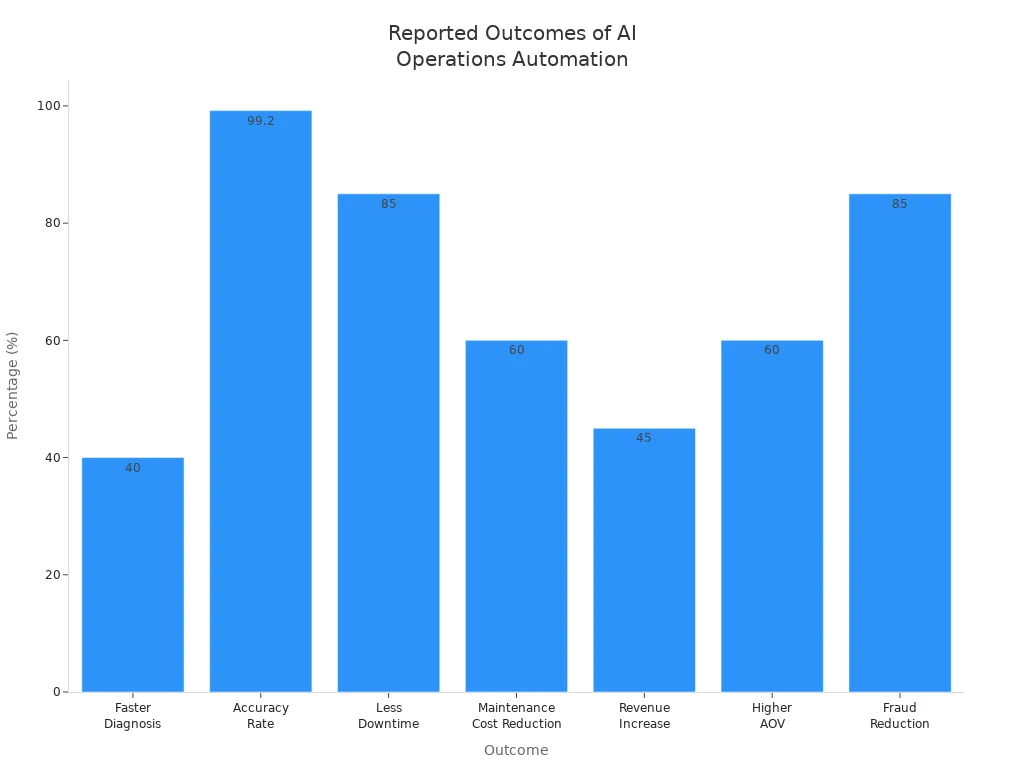
Many companies report a 30% cost reduction, 267% roi in one year, and up to 85% less downtime. Ai and ml help you improve workflow, boost data quality, and protect privacy.
You can unlock real value by adopting AI operations automation. Start by building a culture that supports data-driven decisions and continuous learning. Make sure your team can supervise and improve AI outputs. Use strong governance to manage risks.
- Embed adaptive intelligence in every process
- Train employees to work with AI
- Design workflows for both efficiency and adaptability
- Encourage human-AI collaboration
| Factor | Why It Matters |
|---|---|
| Data Security | Protects privacy and avoids legal issues |
| Infrastructure | Supports scaling and reliable AI operations |
| Talent | Ensures your team can use and improve AI |
Track your progress with metrics like time savings, cost reduction, and fewer errors. Now is the time to review your operations and explore where AI can help you grow.
FAQ
What is the main goal of AI operations automation?
You use AI operations automation to make your business run smoother. AI helps you handle tasks faster, reduce mistakes, and save money. You can focus on important work while AI takes care of routine jobs.
How do you start with AI automation in your company?
Start small. Pick one process that takes a lot of time or has many errors. Test AI on this process. Measure the results. If it works, you can add more AI projects.
Is AI automation safe for your data?
Yes, you can keep your data safe. Use strong security tools, follow privacy rules, and check your systems often. Always train your team to spot risks.
Can AI automation replace human workers?
AI automation helps you with boring or repetitive tasks. You still need people for creative thinking and decision-making. AI works best when you and your team use it as a tool.
See Also
AI-Driven Production Scheduling Based on Demand Trends in 2025
Utilizing AI to Improve Production Forecasting Accuracy in 2024
Is Your AI Software Analyzing Social Media Effectively?
Capacity Planning for Brands Powered by Artificial Intelligence