

You see names like AutoGen, CrewAI, Vellum AI, Microsoft Copilot Studio, Google Vertex AI Agents, IBM Watson Orchestrate, and Salesforce Einstein Automate leading the way in ai multi-agent platforms. These ai tools work together to solve problems and boost operational efficiency. Reports show orchestrated ai teams can increase automation efficiency by over 25% and cut operational costs by 30%. The trend is clear: 80% of companies plan to use ai automation by 2025.
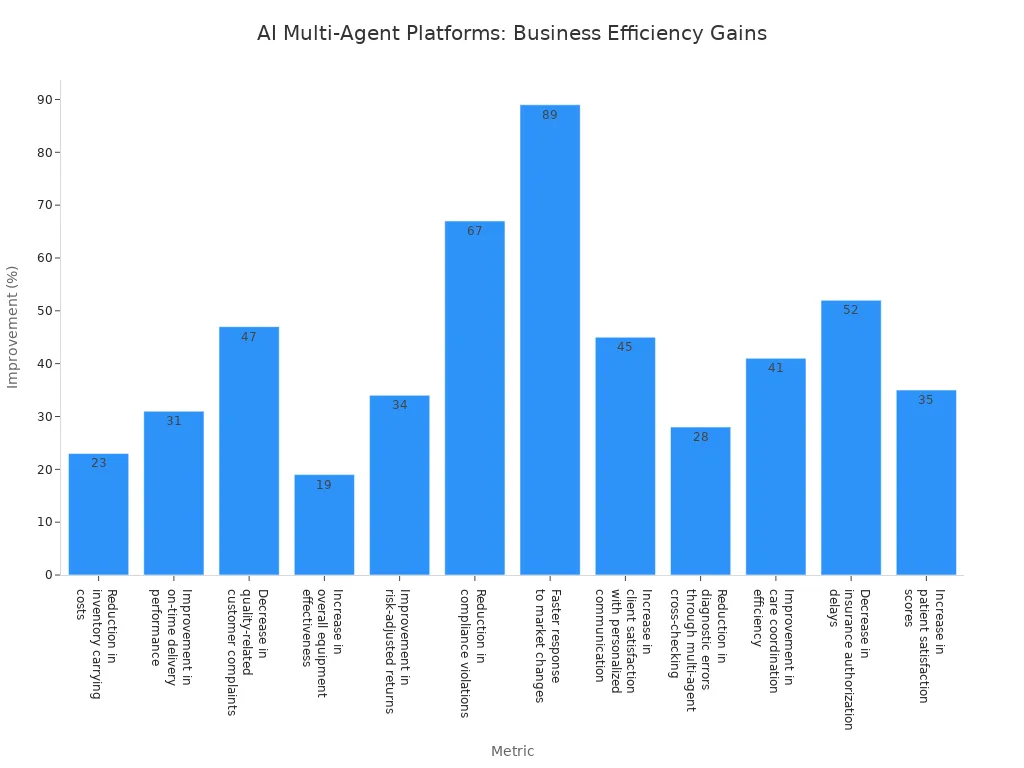
You gain strategic value when you adopt ai multi-agent platforms. They help your business tackle complex challenges and spark innovation.
Leading AI Multi-Agent Platforms
AutoGen Overview
You can use AutoGen as a free and open-source ai agent builder platform. AutoGen lets you create and manage agents that work together to solve business problems. You pay only for the infrastructure and the LLM API usage. The software itself costs nothing, but you need to consider engineering time for development and maintenance. AutoGen gives you flexibility because you can deploy it on your own servers or in the cloud. You can build custom workflows and automate tasks across departments. AutoGen helps you reduce manual work and improve efficiency. Many companies choose AutoGen for its open-source nature and cost control.
CrewAI Features
CrewAI stands out as an ai agent builder platform with advanced collaboration features. You can see how agents delegate tasks to each other and work as a team. CrewAI uses an open-source design, which means you benefit from transparency and community-driven improvements. You can integrate CrewAI with external tools and third-party APIs. The table below shows CrewAI’s advantages compared to other platforms:
| Feature | CrewAI Advantage | Other Platforms |
|---|---|---|
| Agent Collaboration | Sophisticated agent collaboration with autonomous inter-agent delegation | Limited collaboration capabilities |
| Open-source Design | Promotes transparency and community-driven improvement | Often proprietary |
| Integration Capabilities | Flexible integration with external tools and third-party APIs | Typically restricted integration options |
CrewAI supports many real-world use cases. You can automate document processing in finance, manage inventory and pricing in retail, and create omnichannel customer experiences. The table below shows some use cases:
| Sector | Use Case Description |
|---|---|
| Finance | Automates document processing for contracts, loan applications, and KYC forms, enhancing compliance and efficiency. |
| Retail | Dynamic inventory and pricing management through real-time monitoring and updates across eCommerce platforms. |
| Retail | Omnichannel customer experience automation, providing tailored promotions and campaigns based on behavior analysis. |
You can deploy CrewAI on your own infrastructure or in the cloud. CrewAI gives you flexibility and control over your ai agent builder platform.
Vellum AI Capabilities
Vellum AI offers a powerful ai agent builder platform for business automation. You can build agents and workflows using natural language, without writing code. Vellum AI provides a shared canvas for teams to collaborate, review, and comment. You can test changes, compare runs, and roll back instantly. Vellum AI supports enterprise-grade governance with RBAC, approval workflows, SSO, and compliance for SOC 2, GDPR, and HIPAA. You can deploy Vellum AI in the cloud, private VPC, or on-premises. The tables below show Vellum AI’s capabilities:
| Capability | Description |
|---|---|
| No-code building | Users can describe agents or workflows in natural language, and Vellum creates the scaffold automatically. |
| Collaborative features | A shared canvas allows teams from different departments to collaborate with roles, reviews, and comments. |
| Built-in evaluations | Users can test changes, compare runs, and promote safely with instant rollbacks. |
| Enterprise-grade governance | Features include RBAC, approval workflows, SSO, SCIM, and compliance support like SOC 2, GDPR, and HIPAA. |
| Flexible deployment | Options include cloud, private VPC, or on-premises setups to meet various security and residency needs. |
| Capability | Description |
|---|---|
| Collaboration environment | A shared canvas with comments, role-based reviews, and approvals for safe co-building. |
| Governance ready | Features like RBAC, environments, audit logs, and secrets management for security and compliance. |
| AI-native primitives | First-class features for retrieval, semantic routing, tool use, and agent orchestration. |
| Flexible deployment | Options to run in cloud, VPC, or on-premises to ensure data security. |
Vellum AI charges based on actual ai operations. You pay for what you use, not per user or compute hour. This pricing model helps smaller teams predict costs. Larger organizations may need enterprise upgrades. You can choose flexible deployment options, which gives you an advantage over platforms that lock you into a single provider.
Microsoft Copilot Studio
Microsoft Copilot Studio is an enterprise ai agent builder platform. You can orchestrate agents to delegate tasks and collaborate across business-critical operations. Copilot Studio lets agents interact with desktop apps and websites, automating complex tasks. You can bring your own models and fine-tune them for domain-specific responses. The Model Context Protocol connects Copilot Studio to enterprise knowledge systems. Developers get tools to build agents and access Microsoft 365 data securely. The table below shows Copilot Studio’s features:
| Feature | Description |
|---|---|
| Multi-agent orchestration | Enables organizations to build systems where agents can delegate tasks to one another, enhancing collaboration across various business-critical tasks. |
| Computer use in agents | Allows agents to interact with desktop apps and websites like humans, automating complex UI-based tasks with built-in reasoning. |
| Bring your own model | Integrates with Microsoft Foundry, allowing users to bring custom models and fine-tune them for domain-specific responses. |
| Model Context Protocol (MCP) | Simplifies the connection of Copilot Studio to enterprise knowledge systems, enhancing scalability and troubleshooting. |
| Developer tools | Provides developers with various tools to build agents, including Microsoft 365 Copilot APIs for secure access to Microsoft 365 data. |
You can see performance improvements with Copilot Studio. Customer support processes show a 61% reduction in latency and up to 70% fewer human escalations. You can deploy and edit workflows quickly, which boosts operational efficiency. Copilot Studio offers enterprise pricing and cloud deployment, with integration into Microsoft’s ecosystem.
Google Vertex AI Agents
Google Vertex AI Agents give you modularity and scalability. You can break down complex processes into manageable components. Each agent handles a specific task, which improves precision and efficiency. Vertex AI Agents orchestrate collaboration across multi-cloud or hybrid-cloud environments. The table below shows Vertex AI Agents’ capabilities:
| Capability | Description |
|---|---|
| Modularity and Scalability | Breaks down complex processes into manageable components, allowing for specialized task handling. |
| Domain-Specific Intelligence | Tailors each agent to specific business processes, enhancing precision and efficiency. |
| Enterprise-Grade Orchestration | Ensures harmonious collaboration of agents across multi-cloud or hybrid-cloud environments. |
Vertex AI Agents integrate with existing enterprise systems. You can use modular and distributed architecture, assign specialized agents to tasks, and scale easily. The table below compares traditional ai models and multi-agent ai systems:
| Feature | Traditional AI Models | Multi-Agent AI Systems (e.g., Vertex AI) |
|---|---|---|
| Architecture | Monolithic or single-model | Modular and distributed with multiple agents |
| Task Handling | General-purpose, often trained for a single task | Specialized agents assigned to specific tasks |
| Scalability | Limited by model complexity and resource overhead | High scalability via task decomposition |
| Adaptability | Less flexible to context changes or evolution | Agents adapt individually for agile responses |
| Collaboration | Minimal or no inter-model communication | Real-time communication and collaboration among agents |
| Development Time | Long training and retraining cycles | Faster development with reusable agent modules |
| Maintenance | Requires retraining or fine-tuning the whole model | Independent updates or replacement of agents |
| Use Case Fit | Best for isolated, well-defined problems | Suited for complex, multi-step workflows |
| Fault Tolerance | Model failure affects the entire system | Redundant agents improve reliability and fault tolerance |
| Example | Image classification, chatbots | Supply chain orchestration, customer support systems |
You can deploy Vertex AI Agents in the cloud or hybrid environments. Pricing depends on usage and enterprise requirements. Vertex AI Agents help you automate workflows and scale operations.
IBM Watson Orchestrate
IBM Watson Orchestrate is an ai agent builder platform for enterprise coordination. You can integrate Watson Orchestrate with your existing workflows and systems. You do not need to change your infrastructure. You can build agents with no-code or pro-code tools. Watson Orchestrate offers a rich catalog of over 100 domain-specific agents and 400+ prebuilt tools. You get centralized governance, policy enforcement, and compliance tracking. The table below shows Watson Orchestrate’s features:
| Feature | Description |
|---|---|
| Open, interoperable architecture | Designed to integrate with existing workflows and systems without requiring complete infrastructure changes, reducing adoption barriers. |
| No-code and pro-code agent building | Supports both non-technical users and developers in creating AI agents, allowing for flexibility in agent development. |
| Rich catalog of agents & tools | Offers a library of over 100 domain-specific agents and 400+ prebuilt tools, facilitating quicker deployment and adoption of AI capabilities across various business functions. |
| Governance, observability & compliance | Includes features for centralized governance, policy enforcement, and tracking of agent activities to ensure compliance and oversight as AI agents are utilized in business environments. |
Watson Orchestrate delivers business outcomes in finance, supply chain, and customer service. You can accelerate planning, automate budget allocation, improve inventory management, and reduce case resolution times. The table below shows business outcomes:
| Function | Business Outcome |
|---|---|
| Finance | Accelerated planning, forecasting, and scenario analysis; automation of budget allocation and reconciliations. |
| Supply Chain | Improved agility and resilience; optimized inventory and streamlined order management. |
| Customer Service | Reduced case resolution times; improved customer experience; scaled support without increasing costs. |
You can deploy Watson Orchestrate in the cloud or on-premises. Pricing depends on enterprise needs and usage.
Salesforce Einstein Automate
Salesforce Einstein Automate is an ai agent builder platform for business automation. You can design complex workflows visually with Salesforce Flow. Einstein Copilot provides ai-driven actions and skills for conversational automation. Data Cloud unifies customer data, serving as shared memory for agents. You can automate lead qualification, enrichment, scoring, routing, and communication. The table below shows Einstein Automate’s features:
| Feature | Description |
|---|---|
| Salesforce Flow | Acts as the orchestration engine, enabling the design of complex workflows visually with no-code/low-code capabilities. |
| Einstein Copilot | Provides AI-driven actions and skills that can be integrated into workflows, enhancing automation with conversational AI. |
| Data Cloud | Unifies customer data from various sources, serving as a shared memory for agents, crucial for informed decision-making in multi-agent systems. |
| Example Workflow | A lead qualification process involving multiple agents (Inquiry Agent, Lead Enrichment Agent, Scoring Agent, Routing Agent, Communication Agent) that automates lead handling and outreach based on enriched data and scoring. |
Salesforce Einstein Automate lets you automate workflows across sales, marketing, service, and operations. You can integrate platforms and manage increased workloads without hiring more staff. You can automate administrative tasks, generate reports, monitor metrics, trigger alerts, and optimize workflows. You can deploy Einstein Automate in the cloud, and pricing depends on usage and enterprise requirements.
Tip: You can choose from open-source or enterprise ai agent builder platforms. Open-source options like AutoGen and CrewAI give you flexibility and cost control. Enterprise platforms like Vellum AI, Microsoft Copilot Studio, Google Vertex AI Agents, IBM Watson Orchestrate, and Salesforce Einstein Automate offer advanced features, governance, and integration. You can deploy these platforms in the cloud, on-premises, or hybrid environments to match your business needs.
Multi-Agent Systems in Business

Collaboration and Task Sharing
You can use multi-agent systems to improve teamwork and task distribution in your business. These systems let ai agents work together, share tasks, and make decisions quickly. When you use ai for collaboration, you remove delays that often happen with manual handoffs. Multi-agent collaboration means agents can coordinate across departments, which helps your business run smoothly day and night. You also gain the ability to reuse well-designed ai agents in different processes, saving time and money.
Here is a table that shows the main advantages of using multi-agent systems for collaboration and task sharing:
| Advantage | Description |
|---|---|
| Faster Decision-Making | Agents make instant decisions when confidence is high, reducing wait times. |
| Cost Reduction | Reusable agents lower costs across multiple business processes. |
| Operational Efficiency | Agents work 24/7, removing delays from human schedules. |
| Enhanced Collaboration | Agents coordinate across teams without manual steps, improving workflow. |
| Adaptability | Systems adjust quickly to market changes and new business needs. |
| Self-Learning Capabilities | Agents learn and adapt, reducing the need for constant updates. |
| Modular Nature | You can build new automated processes quickly by combining different agents. |
| Consistent Process Context | Information stays accurate and available, reducing errors from bad data. |
You also benefit from real-time workflow execution. Multi-agent systems help you avoid overnight or weekend delays, which is important for global operations. These systems can adapt fast, so you can respond to changes in your market.
Context Management
Multi-agent systems manage context by letting ai agents share information and work in parallel. Each agent can focus on a part of the task, using its own context window. This setup allows for better reasoning and faster results. Communication protocols, like shared memory and message passing, help agents share updates and keep everyone informed. When you use multi-agent workflows, you make sure that information flows smoothly between agents. This reduces mistakes and helps your team reach goals faster.
A lead agent can also create subagents to handle special tasks at the same time. This orchestration lets your business retrieve information and adapt to new needs quickly. You get better collaboration and more accurate results because agents can work together and share what they learn.
Rule-Based Coordination
You can set up rule-based coordination in multi-agent systems to guide how ai agents interact. Rules tell agents when to act, how to share information, and how to solve problems together. This structure keeps your business processes organized and predictable. Rule-based systems help you automate complex tasks, like approvals or escalations, without manual checks. You can update rules as your business grows, making your ai systems flexible and future-ready.
Tip: Use rule-based coordination to ensure your ai agents follow company policies and industry standards. This helps you stay compliant and avoid costly errors.
Multi-agent systems give you a strong foundation for business automation. You gain speed, accuracy, and the ability to scale your operations. By using ai and intelligence in your workflows, you prepare your business for future challenges.
AI Agent Management Platforms
AI agent management platforms give you the tools to deploy, monitor, and customize your ai-powered workforce. These platforms help you manage ai agents across enterprise applications, making automating workflows and automating tasks easier and more secure. You can use these platforms to scale your operations and improve efficiency.
Deployment Tools
You can choose from several deployment tools when you manage ai agents in your business. Each tool offers unique features for enterprise-grade management and integration. The table below compares popular options:
| Tool Name | Key Features | Unique Selling Point |
|---|---|---|
| Moveworks Agent Studio | Rapid development, enterprise-grade security, reasoning engine | Combines rapid development with security and scalability for complex workflows. |
| OpenAI GPTs | Custom model training, natural language interface, API integration | Designed for natural language tasks, accessible to non-technical users. |
| Google Vertex AI Agent Builder | Native Google Cloud integration, pre-built templates, advanced ML | Offers pre-built templates and custom options, ideal for Google Cloud users. |
| LangChain | Open-source flexibility, context-aware processing, extensive integration | Requires technical expertise but offers greater control over agent architecture. |
| AutoGen | Multi-agent orchestration, conversational AI capabilities | Specializes in collaborative AI, enabling multiple agents to work together on tasks. |
You can select a tool that matches your technical skills and business needs. Some tools focus on ease of use, while others give you more control over intelligent agent workflows.
Monitoring and Analytics
Monitoring features are important for ai agent management platforms. You need full visibility into team activities to keep your ai systems secure and reliable. The table below shows common monitoring and analytics features:
| Feature | Description |
|---|---|
| Full visibility into team activities | Lets you monitor actions like creating, updating, or deleting servers and modifying connected tools. |
| Audit trails | Tracks user activities on agents, helping with troubleshooting and security. |
| Customizable alerts | Sends alerts for suspicious activities, improving security. |
| Comprehensive analytics dashboards | Gives you real-time monitoring of key performance indicators and metrics. |
| Trend analysis | Finds performance patterns over time for better planning. |
| Predictive analytics | Warns you about possible issues before they affect your business. |
| Comparative analytics | Compares agent performance across teams or with industry standards. |
You can use these features to keep your ai agent management platforms running smoothly. They help you spot problems early and make better decisions for your business.
Customization Options
You can customize ai agents to fit your business processes. AI agent management platforms let you create role-based access control, so each agent can focus on a special function. You can use no-code or low-code tools to design agents, even if you are not a developer. This flexibility helps you adapt quickly to new business needs and integrate with existing systems. Multi-agent orchestration lets agents work together on complex tasks. Conversational ai capabilities allow agents to interact with users in natural language. Customizable agent roles make it easy to build an ai-powered workforce that matches your goals.
Tip: Use comprehensive management features to tailor your ai agent management platforms for maximum flexibility and integration.
AI agent management platforms give you the power to manage, monitor, and customize your ai systems. You can build a smarter, more adaptable workforce for your enterprise.
Business Value of AI Multi-Agent Platforms
Operational Efficiency
You can boost your business operations with ai multi-agent platforms. These platforms let you automate tasks, coordinate teams, and speed up decision-making. Many organizations see big gains. For example, companies using ai agents to automate 80% of customer-facing processes are expected to outperform others by 2029. In financial services, ai agents helped reduce calls to stores by 47% and raised customer satisfaction scores. Some businesses report 20-30% higher operational efficiency, and in some cases, processes become 50 times more efficient. The table below shows more results:
| Evidence Description | Source |
|---|---|
| Organizations automating 80% of customer-facing processes with multi-agent AI are expected to outperform peers by 2029. | Gartner |
| Calls to stores dropped by 47% after agent deployment, while customer satisfaction rose to 65. | Case Study |
| Conversion rates two to three times higher after using AI agents in sales. | McKinsey |
| Productivity improvements of 3-5% annually with effective agent deployments. | McKinsey |
| 25% faster delivery and 25% more efficiency in warehouse operations. | Case Study |
| 20-30% increases in operational efficiency, with some processes 50 times more efficient. | BCG |
| 30-50% efficiency improvements in procurement through intelligent automation. | BCG |
Cost Optimization
You can save money and control spending with ai multi-agent platforms. These platforms help you cut cloud waste, make spending more predictable, and improve resource use. You get faster decisions and better teamwork between IT and finance. Here are some ways ai helps with cost optimization:
- Reduces idle cloud resources and misconfigured workloads.
- Improves forecasting for stable budgets.
- Speeds up decision-making with real-time insights.
- Optimizes performance to avoid downtime.
- Increases collaboration across teams for better cost control.
You can also use open source frameworks and regular audits to keep costs low. Business ai and enterprise ai solutions make it easier to track and manage expenses.
Innovation Enablement
Ai multi-agent platforms help you create new solutions and drive innovation. You can use ai agents in many industries. In healthcare, ai agents support patient care and medical diagnosis. In finance, they help with market analysis and fraud detection. Legal teams use ai to check compliance and spot fraud. Manufacturing companies improve supply chain coordination and smart factory tasks. Education platforms use ai agents to guide students and create custom learning plans. Data analysis becomes faster and more accurate with ai-powered tools.
| Industry | Application |
|---|---|
| Healthcare | Patient care coordination, medicine data processing, collaborative medical diagnosis |
| Finance | Market analysis in decentralized finance, fraud detection |
| Legal Compliance | Processing complex data, law updates, fraud detection, compliance checks |
| Manufacturing | Supply chain coordination, assembly, inventory management |
| Education | Custom learning plans, autonomous AI tutors |
| Data Analysis | Data preprocessing, trend identification, insight extraction |
Scalability and Adaptability
You can scale your business quickly with ai multi-agent platforms. These platforms support hybrid deployments, so you can use both cloud and on-premises systems. Modular designs let you add new features as your needs grow. You get strong monitoring tools to keep quality high. To succeed, you need teams that combine engineering and business knowledge. Executive leadership and careful planning help you build enterprise ai that adapts to change. This approach lets your business stay flexible and ready for new challenges.
Tip: Use ai multi-agent platforms to build a business that grows and adapts with the market. You gain speed, control, and the power to innovate.
Platform Comparison and Evaluation

Feature Matrix
You need to compare ai platforms before you choose one for your business. The table below shows how leading ai platforms stack up on key features, strengths, and limitations.
| Platform | Key Features | Strengths | Limitations |
|---|---|---|---|
| GitHub Copilot Workspace | Agentic AI Partner, Autonomous Issue Resolution, Advanced AI Models, Enterprise Security, GitHub Actions Integration | Market Leadership, Enterprise Adoption, Mature Ecosystem, Production Readiness | Limited Multi-Agent Capabilities, GitHub Ecosystem Lock-in, Code Quality Concerns, Incomplete Development Lifecycle |
| Cursor AI | VS Code Foundation, GPT Integration, Fast Autocomplete, GitHub Sync, Familiar Interface | Developer Familiarity, Speed, Easy Migration, Competitive Pricing | Surface-Level AI, Limited Multi-File Context, No Multi-Agent Capabilities, Enterprise Limitations |
| Windsurf by Codeium | Cascade Technology, Agentic AI Partner, VS Code Foundation, Large Context Understanding, Real-time Agent Support | Deep Context Understanding, Autonomous Capabilities, Competitive Pricing, Complex Codebase Support | New Market Entry, VS Code Dependency, Slower Performance, Limited Production Features |
| Replit | Zero Setup Development, Ghostwriter AI, Instant Deployment, Multi-Language Support, Educational Tools | Ultimate Accessibility, Educational Excellence, Quick Prototyping, Community Focus | Enterprise Limitations, Performance Constraints, Limited Production Capabilities, Simple AI Assistance |
| Qodo | Test Generation Focus, Code Quality Analysis, IDE Integration, Pull Request Tools, Multi-Language Support | Quality-First Approach, Workflow Integration, Universal Language Support, Developer Experience | Narrow Focus, No Standalone Platform, Limited Multi-Agent Features, Configuration Required |
Pricing Models
You should look at pricing models when you compare ai platforms. The table below shows the cost differences between enterprise SaaS and open source frameworks.
| Type | Monthly Cost | Implementation Services | 3-Year Total Cost | Ownership |
|---|---|---|---|---|
| Enterprise SaaS Platforms | $5,000 - $20,000 | $50,000 - $200,000 | $230,000 - $920,000 | None (rent capability) |
| Open Source Frameworks | $0 (self-hosted) | $50,000 - $200,000 | $50,000 - $300,000 | Full control |
Tip: Open source ai platforms give you more control and lower long-term costs. Enterprise SaaS platforms offer faster setup and support.
Integration Capabilities
You want ai platforms that connect with your business tools. The table below highlights the most important integration features.
| Integration Capability | Importance |
|---|---|
| API Compatibility | High |
| Enterprise System Connectivity | Critical |
| Authentication Mechanisms | Important |
- Multi-agent systems help you collaborate across departments.
- Integration with many tools lets you manage workflows from start to finish.
- Unified workflows make your business more efficient.
User Experience
You should test user experience before you decide. Look for ai platforms with easy interfaces and clear dashboards. Fast setup and simple navigation help your team work better. Good platforms support both technical and non-technical users. You want platforms that let you customize agents and workflows for your business needs.
Note: Choose ai platforms that match your team's skills and your business goals. A good user experience leads to higher adoption and better results.
When you compare ai platforms, focus on features, pricing, integration, and user experience. This approach helps you find the best fit for your business and maximize your return on investment.
Adoption Strategies for AI Platforms
Pilot Implementation
You start your ai journey with a pilot project. Choose a small team or department to test ai multi-agent platforms. Set clear goals for the pilot. You track how ai agents handle tasks and measure improvements. You collect feedback from users. You use this feedback to refine your ai workflows. A pilot helps you see real results before scaling ai across your business.
Change Management
You prepare your team for ai adoption. Communicate the benefits of ai platforms. Explain how ai will change daily tasks. Address concerns about job roles and responsibilities. You involve key stakeholders early. You create a plan for ai integration. You set milestones and review progress. You celebrate small wins to build support for ai.
Tip: Use regular meetings to answer questions and share updates about ai projects.
Training and Onboarding
You train your staff to use ai platforms. Provide hands-on sessions and simple guides. You teach users how to interact with ai agents. You show how ai can automate tasks and improve workflows. You encourage staff to ask questions. You offer ongoing support. You make sure everyone feels comfortable using ai tools.
- Create step-by-step tutorials for ai workflows.
- Assign mentors to help new users.
- Use feedback to improve training materials.
Success Measurement
You measure the impact of ai adoption using clear metrics. You track performance in areas like healthcare, finance, customer service, and retail. You use the table below to guide your evaluation:
| Industry | Key Metrics |
|---|---|
| Healthcare | Clinical accuracy, HIPAA compliance, Patient safety, Explainability |
| Financial Services | Fraud detection accuracy, Compliance adherence, Risk assessment accuracy, Audit trail completeness |
| Customer Service | First contact resolution, Customer satisfaction, Average handling time, Escalation rate |
| E-commerce and Retail | Conversion rate impact, Average order value, Cart abandonment reduction, Customer lifetime value |
You review these metrics regularly. You adjust your ai strategies based on results. You use data to show the value of ai platforms. You share success stories to motivate your team.
You see ai multi-agent platforms changing how you lead your business. You use ai to solve problems, automate tasks, and improve teamwork. You find new ways to boost efficiency with ai. You review your current operations and spot areas where ai can help. You start with a pilot project to test ai in your workflow. You build your team’s skills by learning about ai. You stay updated on ai trends and best practices. You measure success with clear metrics. You keep learning and use ai to drive growth. You make your business ready for the future with ai.
Tip: You gain a strong advantage when you adopt ai early and keep improving your knowledge.
- You use ai to transform your business.
- You build expertise in ai for long-term success.
- You follow industry news to stay ahead with ai.
FAQ
What is an AI multi-agent platform?
You use an ai multi-agent platform to manage several intelligent agents. These agents work together to solve business problems. You can automate tasks and improve teamwork across your company.
How do AI agents help my business?
You gain faster results when you use ai agents. They automate tasks, share information, and make decisions. You see higher efficiency and lower costs in your daily operations.
Can I customize AI agents for my needs?
You can customize ai agents to match your business goals. You use no-code or low-code tools to build agents. You set rules and roles for each agent to fit your workflow.
Is it easy to integrate AI platforms with my current systems?
You connect ai platforms to your existing tools using APIs. You manage workflows and data across departments. You keep your business running smoothly with these integrations.
What industries benefit most from AI multi-agent systems?
You see ai multi-agent systems in healthcare, finance, retail, and manufacturing. You use them to automate tasks, improve accuracy, and support decision-making in many fields.
See Also
Top 10 E-commerce Platforms That Integrate With Accounting
Actionable Ecommerce Strategies for Success in 2025
AI-Driven Safety Stock Solutions for Fashion Retail in 2025