

AI workflow automation always delivers better results than manual tasks. You see faster speed, higher accuracy, easy scalability, and real cost savings when you use AI-powered workflow tools. The latest industry data shows that automation reduces processing errors by 70% and increases productivity by 95%.
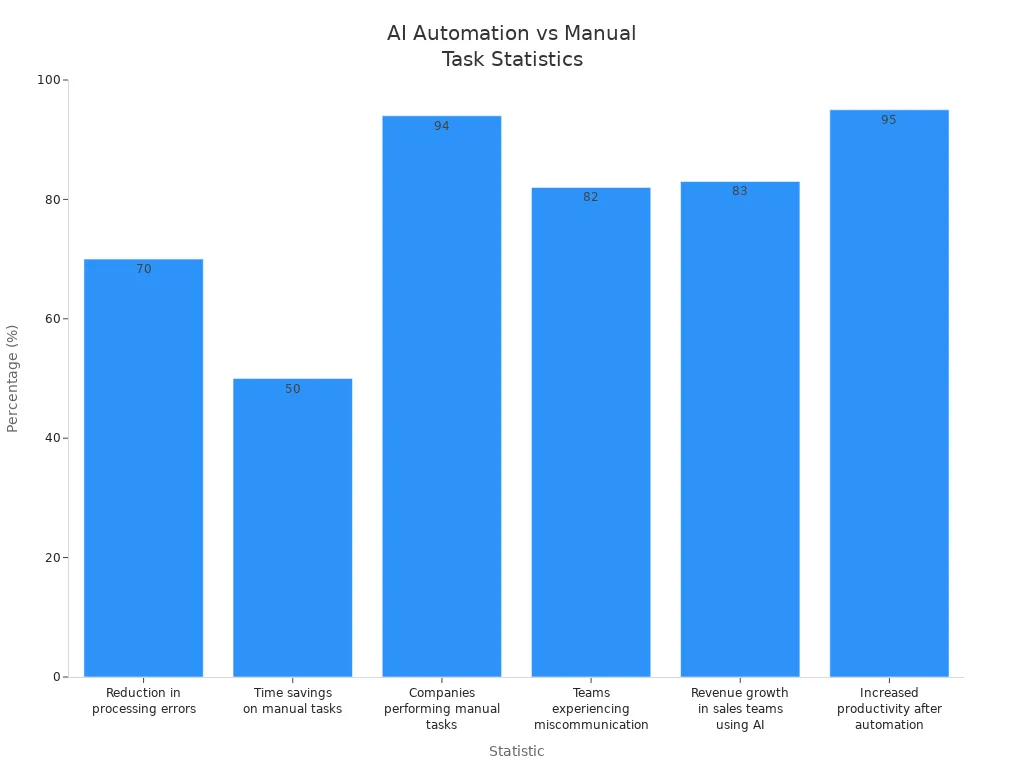
AI workflow automation fits into your business processes and adapts without you needing constant oversight. Tools like Microsoft 365 Copilot help employees save up to an hour each day while handling routine workflow tasks. With AI tools, you can shift your focus to complex work that drives real value and let automation handle repetitive steps.
- AI workflow automation brings these advantages:
- Real-time decisions boost efficiency and productivity.
- Systems learn from data, so you get fewer errors and more consistent results.
- Automation lets your organization scale without extra resources.
- You see cost savings as tools reduce manual labor and operational expenses.
AI Workflow Automation Boosts Efficiency

AI workflow automation changes how you work every day. When you embed ai into your workflow, you streamline tasks and increase speed. You do not need to spend hours on repetitive steps. Instead, you let ai workflow automation tools handle routine work. This shift gives you more time for important projects and creative thinking.
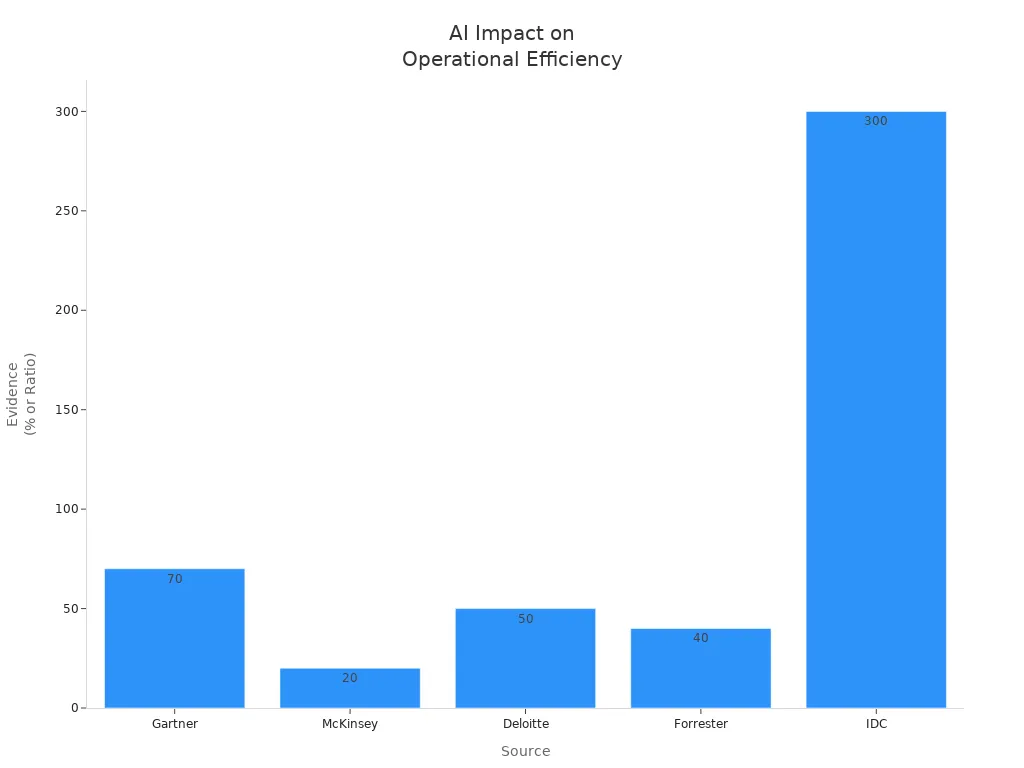
Automating Routine Tasks
You can use ai workflow automation to handle many routine tasks. These include data entry, document processing, and customer service requests. When you automate these tasks, you reduce errors and save time. Many industries have seen big gains from automating tasks with ai. The table below shows how different fields benefit from ai-powered workflow automation:
| Industry | Efficiency Gains | Examples of Automation |
|---|---|---|
| Finance | Significant reductions in processing times and improved accuracy | AI in data analytics, forecasting, investment management, and fraud detection. |
| Manufacturing | Enhanced operations and real-time performance analysis | Digital twin technology for simulating processes without physical intervention. |
| Retail | Improved customer experiences and optimized decision-making | AI algorithms for personalized shopping experiences and AI-powered virtual assistants. |
| General | Reduction in time for routine tasks and improved resource allocation | Robotic process automation (RPA) for tasks like data entry and customer service requests. |
| Maintenance | Predictive maintenance reducing operational costs and extending asset lifespan | AI analyzing sensor data to predict equipment failures before they occur. |
| Document Handling | Swift extraction of insights from documents, allowing focus on strategic initiatives | AI agents crafting tailored proposals and extracting valuable insights from contracts and reports. |
| Customer Engagement | Hyper-personalized shopping experiences leading to increased conversion rates | AI systems curating product recommendations based on browsing habits and previous purchases. |
You do not need to be a tech expert to set up automated workflows. Visual workflow design makes it easy for you to build and change processes. You can drag and drop steps, set rules, and see your workflow in action. This feature lets you focus on results, not on coding. Many workflow automation tools offer no-code builders, so you can create custom solutions for your business needs.
Tip: Use visual workflow design to speed up implementation. You can quickly adjust your workflow as your needs change.
Faster Decision-Making
AI workflow automation helps you make decisions faster. You get real-time data and instant analysis. This means you do not wait for reports or manual checks. Studies show that organizations using ai automation tool solutions see decision cycles that are 40–60% faster than traditional methods. The table below highlights these findings:
| Evidence Type | Findings |
|---|---|
| Faster Decision Cycles | AI workflow automation enables 40–60% faster decision cycles compared to traditional methods. |
| Improved Decision Quality | Organizations report 25–35% better decision outcomes with AI support. |
| Productivity Increase | Automation technologies can increase productivity in operational processes by as much as 30% by eliminating waiting time between tasks. |
You can trust ai to deliver better decision outcomes. With ai tools, you get more accurate results and less guesswork. This leads to higher efficiency and better use of resources. You can also customize your workflow to fit your team’s needs. Features like real-time alerts, automated approvals, and smart routing help you respond quickly to changes.
When you use the best ai workflow automation tools, you unlock the full potential of your data. You can analyze trends, spot problems early, and act before issues grow. AI-powered workflow automation gives you a clear advantage in today’s fast-moving world.
Accuracy And Consistency
Minimizing Errors
You want your business to run smoothly. Errors can slow you down and cost money. When you use ai workflow automation, you cut down on mistakes. Manual work often leads to errors because people get tired or distracted. Automation uses ai to follow the same steps every time, so you see fewer problems.
- Organizations that use automation have seen up to a 50% drop in errors, especially in finance and document processing.
- Some companies report a 70% reduction in processing mistakes after switching to intelligent automation.
- Automation applies the same logic to every workflow, which helps you avoid the errors that come from manual tasks.
You can trust ai to check details and catch issues before they become bigger problems. In finance, ai workflow automation improves accuracy in transactions and helps with compliance. In healthcare, ai makes sure patient records and insurance checks are correct, so staff can focus on care.
Note: Automation not only saves time but also helps you meet important rules and standards in your industry.
Standardized Results
You need results you can count on. Ai workflow automation gives you the same outcome every time you run a process. Ai looks at incoming data, makes decisions based on context, and follows set rules. This means you get consistent results, no matter how many times you repeat the workflow.
Automated workflows help you avoid the mistakes that come from manual data entry. Ai checks information instantly and triggers the right actions. This keeps your business running smoothly and helps you meet quality standards.
| Benefit | Description |
|---|---|
| Monitor Regulatory Updates | Ai tracks changes in rules and keeps your workflows up to date. |
| Identify Affected Processes | Ai finds which workflows need changes when new rules appear. |
| Suggest Workflow Adjustments | Ai recommends updates to keep your business compliant. |
| Verify Compliance | Ai checks that every workflow follows the latest regulations. |
| Document Changes | Ai keeps records of all updates for easy audits. |
Ai workflow automation makes it easier to follow industry rules. In finance, ai helps with audit reports and fraud checks. In healthcare, ai keeps patient data safe and meets privacy laws. You get peace of mind knowing your workflows are accurate and consistent every time.
Scalability And Flexibility
Adapting To Growth
You want your business to grow without limits. ai workflow automation gives you the power to handle more work as your company expands. When your order volume increases, ai can process more requests without slowing down. For example, an e-commerce company used ai-powered order processing during a big sale. The system managed 15 times the normal number of orders. It did not need extra staff or more time. The accuracy stayed at 99.8%, even during the busiest hours.
Many companies see fast results when they use ai workflow automation. About 74% of businesses using generative ai report a return on investment in the first year. Over 64% of daily users notice big improvements in productivity. You can trust ai to keep up with your needs as your business grows.
| Feature | Description |
|---|---|
| Elastic capacity | Adjusts to workload demands, so you never feel resource strain. |
| Consistent performance | Keeps quality high, even when you process more work. |
| Standardized quality | Delivers the same results every time, which helps you keep service strong. |
| Simplified onboarding | Makes it easy to add new team members or partners to your workflow. |
| Centralized governance | Gives you control while letting teams work independently. |
Tip: Use ai workflow automation to scale up during busy times and scale down when things are quiet. This saves money and keeps your business flexible.
Managing Complex Processes
You face many complex processes as your business grows. ai workflow automation helps you manage these challenges. ai can connect different systems and departments. It keeps your workflow running smoothly, even when you add new steps or change your process.
ai workflow automation adapts to your needs. You do not need to rebuild your workflow every time you grow. ai learns from your data and improves over time. This means you can handle more tasks and make better decisions. You also get real-time insights that help you stay ahead of problems.
| Aspect | AI Workflow Automation | Traditional Automation |
|---|---|---|
| Scalability | Grows with your business without big changes | Needs lots of updates to handle growth |
| Flexibility | Works with many systems and teams | Hard to connect with other tools |
| Performance | Stays strong, even with more work | May slow down when you add more tasks |
- ai workflow automation gives you:
- Greater flexibility and scalability than old methods.
- The ability to learn and adapt, which boosts efficiency.
- Insights that help you stay competitive.
You can trust ai to reduce errors and improve how you handle complex workflows. This makes your business stronger and ready for the future.
Cost Savings And ROI
Reducing Operational Expenses
You want to lower costs and boost efficiency. AI workflow automation helps you do both. When you use automation, you cut out manual steps and reduce errors. This means you spend less on fixing mistakes and more on growing your business. AI workflow automation tools handle data entry, lead routing, and follow-ups. These features save time and money.
Here is how automation can reduce your expenses:
| Cost Savings Percentage | Description |
|---|---|
| 30–50% | Companies adopting AI workflow automation can reduce operational expenses significantly while enhancing productivity across teams. |
| 25–50% | Organizations implementing AI in business processes report substantial cost reductions in targeted areas, with savings compounding over time. |
| 60–75% | For a finance team of 10, AI automation can lead to efficiency gains, resulting in a strong return on investment. |
AI workflow automation gives you features like predictive insights and automated workflows. These tools help you use resources better and avoid waste. You can see cost savings in many areas, from customer service to finance. For example, automated data entry removes human error and saves employee time. Intelligent lead routing and automated follow-ups make sure you never miss an opportunity.
| Automation Capability | Description |
|---|---|
| Automated Data Entry | Eliminates manual data entry, reducing human error and saving employee time. |
| Intelligent Lead Routing | Analyzes leads and assigns them efficiently, increasing conversion rates. |
| Automated Follow-Ups | Ensures timely customer follow-ups, preventing missed opportunities. |
| Predictive Insights | Analyzes data to optimize resource allocation and improve decision-making. |
| Overall Impact | Organizations report operational cost reductions of 30–50% after implementing AI workflows. |
Tip: Use the best ai workflow automation tools to automate routine tasks and see quick cost savings.
Improving Investment Returns
You want your investments to pay off. AI workflow automation helps you get more value from every dollar you spend. Many industries have seen strong returns after using ai workflow automation. Financial institutions report ROIs between 3x to 7x. Manufacturing companies see big cost savings. Retailers and banks complete tasks up to twice as fast with ai.
Here are some real-world results:
- American Express saw a 25% drop in customer service costs and a 10% rise in customer satisfaction by using ai chatbots.
- Siemens cut production time by 15% and reduced costs by 12% with ai-powered automation.
- Unilever lowered inventory costs by 10% and transportation costs by 7% through ai solutions.
A recent McKinsey study found that companies using ai workflow automation report an average ROI of 25-30%. These numbers show that ai and workflow automation tools can transform your business. You get faster results, better use of resources, and higher profits. When you choose the right tools and features, you set your business up for long-term success.
Note: AI workflow automation adapts as your needs change, so your investment keeps working for you.
Real-World Examples

You can see the true power of ai workflow automation when you look at real companies. These examples show how ai, automation, and workflow tools work together to solve problems, save time, and improve results. You will notice that these tools do more than just speed up tasks. They help you make better decisions, reduce errors, and create a smoother experience for everyone involved.
AI Workflow Automation In Finance
Finance teams handle many repetitive tasks every day. These include invoice processing, reconciliation, and financial reporting. When you use ai workflow automation, you can cut down on manual work and boost accuracy. Many leading companies have already seen big improvements.
- PayPal uses an ai engine to fight fraud. This system reduced false positives by over 50%. It helped prevent $4.3 billion in fraud losses in just one year.
- Algar Telecom’s ai agent, called Billy, reviewed invoices and caught billing errors. This saved the company $1.5 million in extra profit.
- JPMorgan Chase created the COiN program. This ai tool reduced 360,000 hours of legal work each year to just seconds. It improved processing speed and made compliance easier.
- KPMG added ai to its audit workflows. The company improved efficiency by 20–25% and delivered more reliable results.
You can see how much manual work drops when you use ai workflow automation tools in finance. The table below shows the reduction in manual work for common finance tasks:
| Task | Reduction in Manual Work |
|---|---|
| Invoice processing | 70-90% |
| Month-end close | 40-50% |
| Reconciliation | 60-80% |
| Financial reporting | 50-70% |
| Accounts receivable | 40-60% |
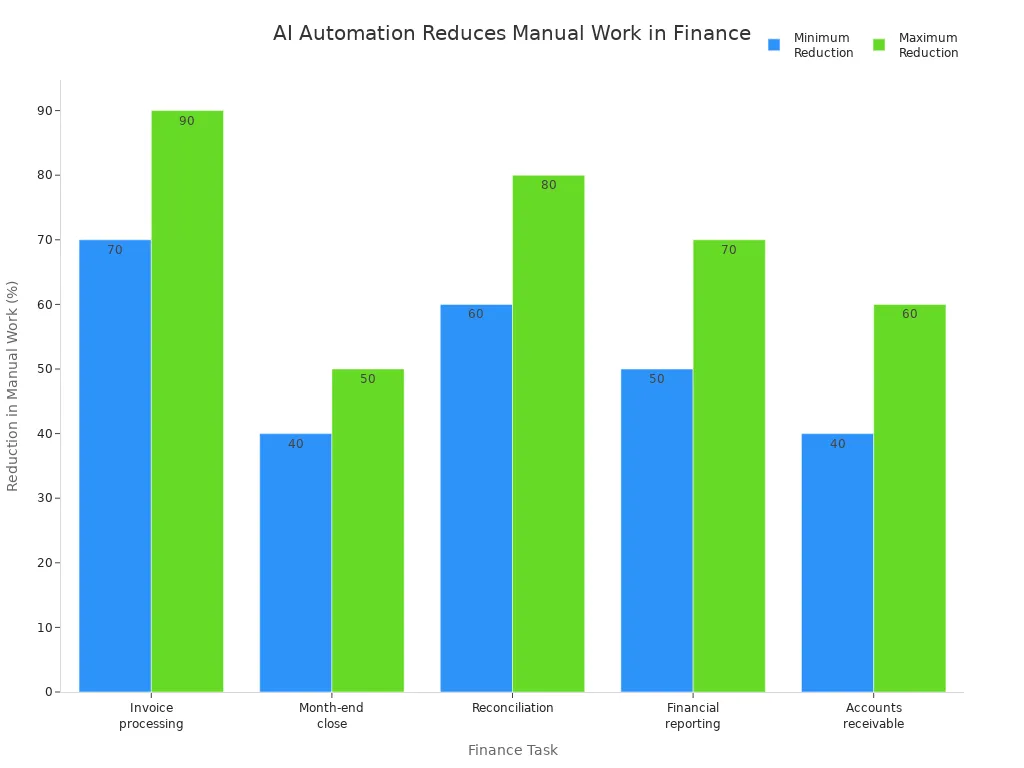
When you use ai workflow automation, you do not just save time. You also get more accurate results and fewer mistakes. These tools help you follow rules and keep your data safe. You can trust ai to handle large amounts of information and spot problems before they grow.
Customer Support Automation
Customer support teams answer many questions every day. They solve problems, guide users, and keep people happy. When you use customer support automation, you let ai handle simple requests. This gives your team more time to focus on complex issues.
| Benefit | Impact |
|---|---|
| 24/7 virtual assistants | Immediate assistance for common inquiries |
| Automated onboarding processes | Adaptation to individual roles |
| Intelligent knowledge bases | Improvement with usage |
| Predictive support | Addresses issues before they escalate |
| Personalized learning recommendations | Based on performance data |
| 60% faster resolution times | For common issues |
| 35% reduction in support tickets | Requiring human intervention |
You can see how ai workflow automation changes the way you support customers. Ai systems answer questions at any time of day. They learn from each interaction and get better over time. Your team can focus on tasks that need a human touch. This leads to faster answers and happier customers.
- Ai workflow automation streamlines processes and reduces manual tasks.
- Support teams can focus on complex issues while ai handles routine inquiries.
- This leads to faster resolution times and improved customer satisfaction.
- Ai systems create interconnected support ecosystems that learn and improve service delivery.
You can also use ai workflow automation to connect different departments. For example, Kaiser Permanente used ai to automate clinical documentation. This saved doctors up to two hours each day and improved patient care. Arizona State University used automation tools to speed up student application processing by 50%. These examples show how ai can help you optimize processes across your whole organization.
Many organizations measure the success of ai workflow automation by looking at key metrics. A retail company used a balanced scorecard to track efficiency, financial impact, customer experience, and employee satisfaction. They found that automation not only improved operations but also reduced employee turnover. When you follow best practices, you can see 30–40% higher returns on your investment and get value faster.
Tip: Start with clear goals and measure your results. Use pilot programs to test new tools and scale up as you see success. Invest in training so your team can get the most from ai workflow automation.
Addressing Concerns
Job Security
You may worry about job security when your company introduces ai workflow automation. Many people feel uncertain when they see ai receptionists or new automation tools. Surveys show that most companies use ai to help employees, not replace them. You can see this in the blended workforce model, which combines ai with human roles.
- 88% of CFOs did not report a decrease in headcount after adopting ai.
- 31% of CFOs moved employees to higher-value work instead of cutting jobs.
- Human agents often report greater job satisfaction when they focus on meaningful tasks and let ai handle repetitive work.
- Employees experience less stress and fewer errors when they work alongside ai systems.
- Automation allows you to spend more time on creative projects and relationship management.
Note: Ai is a productivity multiplier. It complements your skills and helps you grow. Companies redirect staff to advisory roles, which increases revenue and job satisfaction.
Integration Challenges
You may face challenges when you start using ai workflow automation. Complex IT systems can make integration difficult. It is important to choose ai tools that fit your current systems and support smooth data flow. Poor data quality can lead to mistakes, so you should invest in data audits and clear ownership of data sources.
| Strategy | Description |
|---|---|
| Focus on data quality | Use accurate and reliable data to improve ai outcomes. |
| Seamless integration | Connect ai solutions with existing systems for efficient workflows. |
| Phased implementation | Roll out ai in stages and gather feedback to improve the process. |
- Start with pilot programs and scale gradually.
- Invest in training and support for your team.
- Stay flexible and adapt your approach as needed.
- Communicate clearly and manage change effectively.
- Set measurable success metrics to track progress.
Tip: Design automation with flexibility. Integrate ai into existing tools and workflows. Keep humans in the loop to ensure transparency and trust. Address security and privacy risks by setting boundaries and demanding vendor transparency.
You gain many advantages when you use ai workflow automation in your business. Ai improves speed, accuracy, and scalability while reducing costs. The table below highlights key benefits:
| Benefit | Description |
|---|---|
| Scalable Process Management | Ai adapts as your business grows. |
| Real-time Decision Support | Ai helps you make faster, smarter choices. |
| Enhanced Compliance | Ai keeps your workflow aligned with regulations. |
| Improved Customer Experience | Ai delivers quick, personalized service. |
Start by reviewing your current processes and look for areas where ai and automation can help. Choose tools that fit your needs and support future growth. Explore platforms like generative ai, chatbots, and robotic process automation to get started.
FAQ
What types of tasks can AI workflow automation handle?
AI workflow automation can manage data entry, document processing, customer support, and scheduling. You can also use it for reporting, approvals, and notifications. It works best with repetitive or rule-based tasks.
Is AI workflow automation hard to set up?
You do not need to be a tech expert. Many tools offer visual builders and step-by-step guides. You can drag and drop steps, set rules, and launch workflows quickly.
Will AI automation replace my job?
AI helps you by taking over repetitive work. You get more time for creative and important tasks. Most companies use AI to support employees, not replace them.
Tip: Learn new skills and focus on tasks that need human judgment.
How do I measure the success of AI workflow automation?
You can track time saved, error reduction, cost savings, and customer satisfaction. Many tools provide dashboards and reports. Set clear goals before you start.
See Also
Utilizing AI To Improve Production Forecasting Accuracy In 2024
Accelerating Market Entry Through AI's Impact On Lead Times
The Essential Role Of SaaS WMS In Modern Warehousing
Cutting-Edge Technologies Revolutionizing Warehouse Efficiency By 2025