
You probably notice how e-commerce keeps changing. AI 3D product rendering now lets you bring your product to life with just a few clicks. Instead of flat photos, shoppers can interact with 3D images or even try products in AR. Sellers like you, no matter your tech skills, find these tools easy to use. Just look at how fast the market is growing:
| Year | Market Size (in billion USD) | CAGR (%) |
|---|---|---|
| 2025 | 8.53 | N/A |
| 2026 | 10.54 | 23.6 |
| 2030 | 24.37 | 23.3 |
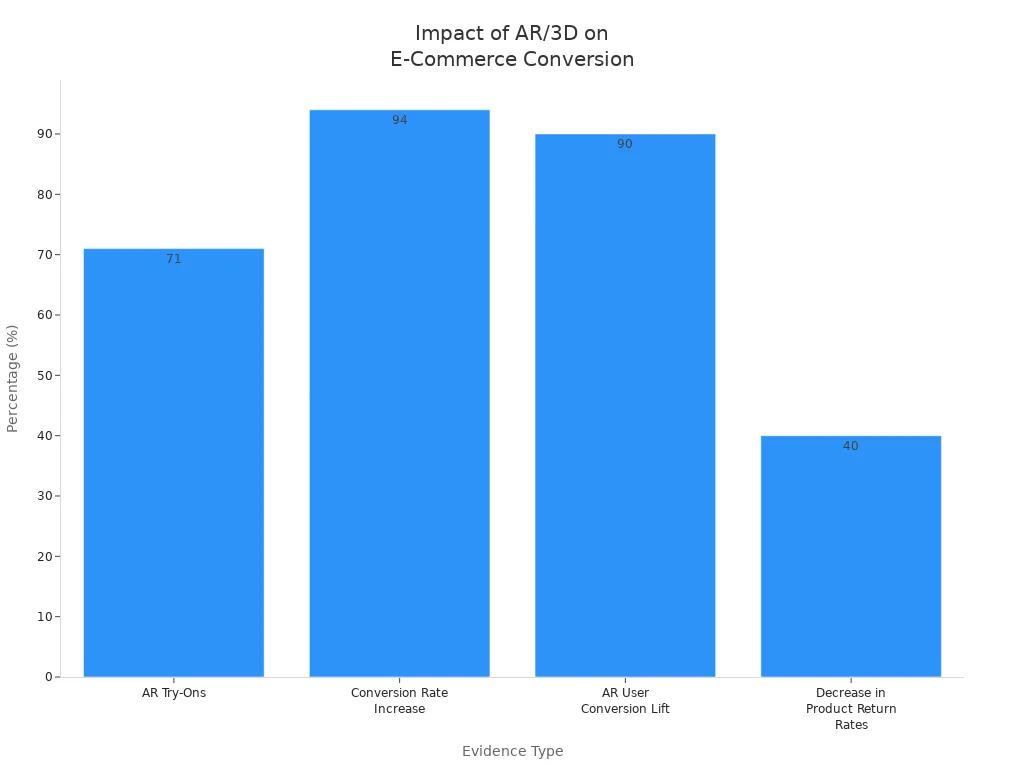
When you switch from 2D to 3D or AR, shoppers respond. Studies show that 71% would shop more with AR, and conversion rates can jump by 94%. Returns also drop by up to 40%.
AI 3D Product Rendering In E-Commerce

What Is AI 3D Product Rendering
You might wonder what ai 3d product rendering actually means. In simple terms, it’s a way to turn regular photos or sketches of your product into interactive 3d models using ai. You don’t need to be a tech expert or hire a big design team. These tools use smart technology to create lifelike images that shoppers can spin, zoom, and even place in their own space with augmented reality.
Here’s a quick look at the core technologies behind ai 3d product rendering:
| Technology | Description |
|---|---|
| Photorealistic 3D Rendering | Makes your product look real and detailed, grabbing customer attention. |
| AI-driven Design Automation | Speeds up the process, so you get results faster and with less effort. |
| Cloud-based Collaboration | Lets you and your team work together and make changes in real time. |
Impact On E-Commerce Listings
Switching from flat images to 3d models changes the game for e-commerce. You can now show your product from every angle, helping buyers feel more confident. Brands using these tools have seen big results. For example, Rollie Nation boosted their conversion rate by 39% after adding 3d visualization. eBay saw $800 million in extra sales just by improving how products look online. When you use ai 3d product rendering, you make your listings stand out and keep shoppers engaged.
Interactive And AR Shopping Experiences
Interactive 3d and AR features make online shopping more fun and personal. Shoppers can try out products virtually, like seeing how a chair fits in their living room or testing makeup on their face. This hands-on experience helps people understand what they’re buying and makes them more likely to complete a purchase. Studies show that AR makes shopping easier and more enjoyable, leading to higher satisfaction and fewer returns. Retailers like IKEA and Sephora have seen huge jumps in engagement and sales by letting customers interact with products in new ways.
Step-By-Step Guide To AI-Powered Product Visualization

Ready to see how easy it is to create 3d product visualization for your store? Let’s break down the process into simple steps. You don’t need to be a tech expert. Just follow along, and you’ll soon have high-quality 3d render visuals that boost conversions and build buyer confidence.
Capturing Product Images
Start by taking clear photos of your product. Good images help ai 3d product rendering tools turn product images into 3d models that look real. You don’t need fancy gear, but using the right camera and lighting setup makes a big difference.
- Use high-speed cameras for sharp, detailed shots. Brands like Hasselblad and Sinar work well. If you use PhotoRobot systems, a Canon camera is a good match.
- Set up high-speed Broncolor studio lights. These lights freeze motion and keep your product crisp.
- Make sure your camera connects with USB 3.0 or faster. This keeps your workflow smooth and avoids delays.
Tip: Take photos from at least three different angles. Many ai-powered product visualization tools can create 3d product renders with just three images, thanks to fast multi-view 3d generation.
Generating 3D Product Renders
Once you have your images, it’s time to create 3d product visuals using ai-driven rendering. Modern image-to-3d ai tools use smart techniques to convert images to 3d models quickly and accurately.
Here’s a look at some of the top generative ai methods:
| Technique | Description |
|---|---|
| Convolutional Neural Networks | These help with depth estimation and pull features from your 2D images. |
| Neural Radiance Fields (NeRF) | Great for complex shapes using photos from different angles. |
| Generative Adversarial Networks | These generate 3d shapes by training on lots of 2D images. |
| Variational Autoencoders | They turn your 2D images into a code that builds 3d structures. |
You can create 3d product previews that look photorealistic and show every detail. This step helps you stand out in e-commerce and gives shoppers the clarity that reduces returns.
Refining AI-Enhanced 3D Visualization
After you generate your 3d product renders, you might want to tweak them for the best results. Ai-enhanced 3d visualization tools let you adjust lighting, textures, and colors to get professional quality renders.
But you may run into some common challenges:
| Challenge | Description |
|---|---|
| Consistency and Predictability | Sometimes, the output quality changes. This can affect your project timeline. |
| Control Over Specific Details | You might have less control over lighting or textures than with old methods. |
| Integration and Compatibility | Some ai software may not work with your current workflow. |
| Resource Intensiveness | Creating high-quality 3d render visuals can use a lot of computer power. |
| Ethical Considerations | Think about data privacy and fairness when using ai. |
Tip: Use ai-powered material mapping to get realistic surfaces and colors. This helps your 3d product previews look just like the real thing.
Embedding 3D Renders In Listings
Now you have your 3d product visualization ready. The last step is to add these visuals to your online store. Each platform has its own rules for 3d product renders, so check the details before you upload.
Here’s a quick guide for major platforms:
| Platform | Preferred Format | File Size Target | Polygon Budget | Texture Size | Notes |
|---|---|---|---|---|---|
| Shopify | GLB + USDZ | Under 15 MB (5 MB best) | No hard cap; optimize | PNG/JPG, PBR pipeline | OS 2.0 theme needed; Shopify auto-optimizes files |
| Amazon AR View | GLB binary | Under 5 MB | Under 20,000 triangles | Max 1024 x 1024 px | Brand Registry needed; no animations; 2-week review |
| Google Merchant | glTF or GLB | Under 10 MB (15 MB max) | Optimize for web | Max 2048 x 2048 px | Needs schema markup; available in select countries |
| Apple Quick Look | USDZ | 4–8 MB practical | Under 100,000 triangles | Under 4K, 2K best | Native AR in Safari; supports Apple Pay |
- For Amazon, keep your 3d product renders under 5MB and use PBR materials for the best look.
- A clean GLB file works across most platforms.
- Make sure your visuals load fast and look sharp on any device.
When you embed 3d product previews, you give shoppers a hands-on experience. This boosts conversion and gives buyers confidence in their purchase. You also get consistency across platforms, which helps your brand look professional everywhere.
Pro Tip: Always test your 3d product visualization on different devices before you go live. This ensures your photorealistic visuals look great for every shopper.
With these steps, you can easily create, refine, and share ai 3d product rendering for your store. You’ll see more engagement, fewer returns, and a shopping experience that stands out.
Advantages Of AI-Enhanced 3D Visualization
Speed And Cost Savings
You want to get your product visuals online fast and save money. AI makes this possible. Traditional photography can take weeks and costs a lot because you need sets, props, and people. Manual 3D modeling also takes weeks and needs experts. With AI-enhanced 3D visualization, you can create stunning visuals in under an hour and pay much less.
| Method | Time Required | Cost Implications |
|---|---|---|
| Traditional Photography | Weeks | High due to manual labor |
| Traditional 3D Modeling | Two weeks | Significant due to specialist work |
| AI-Enhanced 3D Visualization | Under an hour | Dramatically reduced costs |
You also help the planet. 3D rendering cuts down on physical photoshoots, props, and shipping. This means less waste and lower carbon emissions.
Traditional methods of visual content creation require extensive resources, including sets, lighting, and props, leading to significant resource consumption and carbon emissions. In contrast, 3D rendering minimizes reliance on physical materials and transportation, thus reducing environmental impact.
Consistency Across Platforms
You want your product to look great everywhere—on Shopify, Amazon, or social media. AI-generated visuals keep lighting, angles, and style the same across all platforms. This builds trust and makes your brand look professional. Life Outdoor Living used 3D visualization to create a library of assets. Their visuals stayed sharp and consistent, which made customers trust them more.
Scalability For Multiple Products
If you sell many products, you need visuals for all of them. AI 3D rendering helps you scale up fast. You can make lots of images for different colors, backgrounds, or campaigns without extra work. Here’s how it helps:
| Benefit | Description |
|---|---|
| Quicker Production Schedules | AI 3D rendering allows for faster creation of product visuals, enabling sellers to keep up with demand. |
| Simplified Material Variety | Sellers can easily create different variations of products without extensive resources. |
| Increased Customer Interaction | Enhanced visuals lead to better engagement with customers, improving conversion rates. |
| Cost Reduction | Rendering can lower production costs significantly compared to traditional photography. |
| Limitless Variations | Sellers can produce numerous images for different colors, backgrounds, and campaigns efficiently. |
Improved Buyer Engagement
Buyers love to interact with 3D product visuals. These visuals keep shoppers on your page longer—up to 60 seconds. People spend 15-30 seconds just playing with the 3D view. When you use high-quality visuals, you build confidence and trust. Shoppers say that visuals matter more than price or reviews. Sharp, well-lit images make buyers feel good about their choice and reduce returns.
- 3D Views can increase the time a customer spends on a product page by 40%, reaching 50-60 seconds.
- The average interaction time with a product’s 3D View is between 15-30 seconds, depending on the product category.
- Purchase intent increases by 29% when 3D Views are utilized.
- High-quality product imagery is the most powerful driver of shopper trust and purchase decisions on ecommerce pages.
- 93% of consumers prioritize visual appearance over price, reviews, and brand name as the primary trigger for purchases.
- Sharp, well-lit images build trust and credibility, while inconsistent visuals create doubt.
- High-fidelity 3D models enhance buyer confidence by maintaining product accuracy and providing personalized presentations.
You get more conversions and fewer returns when buyers trust what they see.
Practical Tips And Tools For 3D Product Renders
Overcoming Common Challenges
You might run into a few bumps when you start using AI for 3D product visuals. Some products have shiny surfaces or tiny details that need extra attention. If you have a big inventory, you need tools that can handle lots of products at once. Keeping your visuals sharp and consistent helps build buyer confidence and keeps returns low. Here’s a quick look at common challenges:
| Challenge | Description |
|---|---|
| Product Complexity | Shiny or detailed products may need more work to look right. |
| Inventory Size | Large catalogs need batch processing for fast, automatic visuals. |
| Quality Standards | Consistent visuals help meet customer expectations and boost conversions. |
3D models and product data are valuable. Protect them from unauthorized access or misuse. You may want to talk to cybersecurity experts and use strong data protection. Cloud-based platforms make security and privacy even more important in e-commerce.
Best Practices For Quality Renders
You want your product visuals to look amazing and help shoppers trust what they see. Try these best practices:
| Best Practice | Description |
|---|---|
| Control over Geometry | Make sure your tools keep shapes accurate and consistent. |
| Workflow Integration | Pick tools that fit into your current process for smooth visualization. |
| Input Flexibility | Use tools that handle different types of product images. |
| Speed and Cost-Effectiveness | Choose tools that give quick results and save money. |
- Get good at writing prompts for AI tools.
- Keep learning about new features and workflows.
- Use your design sense to tweak AI outputs.
- Work with your team to get the best results.
Recommended AI Tools For E-Commerce
You have lots of choices for creating 3D product visuals. Here are some top picks:
- 3D AI Studio: This tool does it all—from photos to interactive 3D, texturing, 360 spins, and AR. It works for small shops and big brands.
- AI image generators: Great for making 2D product visuals and backgrounds.
- Commerce AR platforms: Perfect for showing off big catalogs with 3D and AR embeds.
- AI video tools: Use these for 360 spins and animated product reveals.
- Photogrammetry apps: Scan real products for super-accurate 3D models.
Some platforms, like Spectrum, help you show the right products in each market and send orders to the right place. This makes it easy to grow your e-commerce business without extra work.
You can transform your e-commerce store with AI 3D product rendering. Sellers like City Furniture and Flexsteel saw more revenue and longer session times after switching to 3D visuals. AI makes your product images consistent, accurate, and engaging. You might face a learning curve, but the benefits—cost savings, better buyer confidence, and fewer returns—make it worth the effort. Ready to stand out? Try AI-powered product visualization and watch your sales grow.
Don’t let old misconceptions hold you back. Modern AI tools are easy to use and deliver real results.
| Trend Description | Projected Impact |
|---|---|
| Integration of AI and machine learning | Smarter, more intuitive 3D rendering |
| Rise of virtual and augmented reality | More immersive shopping experiences |
| Cost decline and improved accessibility | Surge in adoption worldwide |
FAQ
How many photos do I need to create a 3D product render?
You only need three clear photos from different angles. Some AI tools can work with even fewer, but three gives the best results. Make sure your images show all sides of your product.
Do I need special equipment to get started?
No, you can use a smartphone or a basic camera. Good lighting helps a lot. You do not need expensive gear or a studio setup.
Can I use 3D renders on any eCommerce platform?
Most platforms like Shopify, Amazon, and Google support 3D or AR files. Check the file format and size limits for each site. GLB and USDZ formats work almost everywhere.
Will AI 3D rendering increase my sales?
Yes, 3D and AR visuals can boost conversions and reduce returns. Shoppers trust what they see. Many brands report higher sales after switching to interactive product views.
Is it hard to learn AI 3D product rendering?
Not at all! Most tools have simple steps and guides. You can start with no design experience. If you get stuck, many platforms offer tutorials and support.
See Also
Advantages of Blind Shipping for Today's E-commerce Businesses
Enhancing Productivity Through Intelligent E-commerce Warehouse Techniques
Cutting-Edge E-commerce Strategies for 2025: A Practical Guide
The Evolution of E-commerce Services: What Lies Ahead
Grasping Blind Shipping: Essential for E-commerce Achievement