
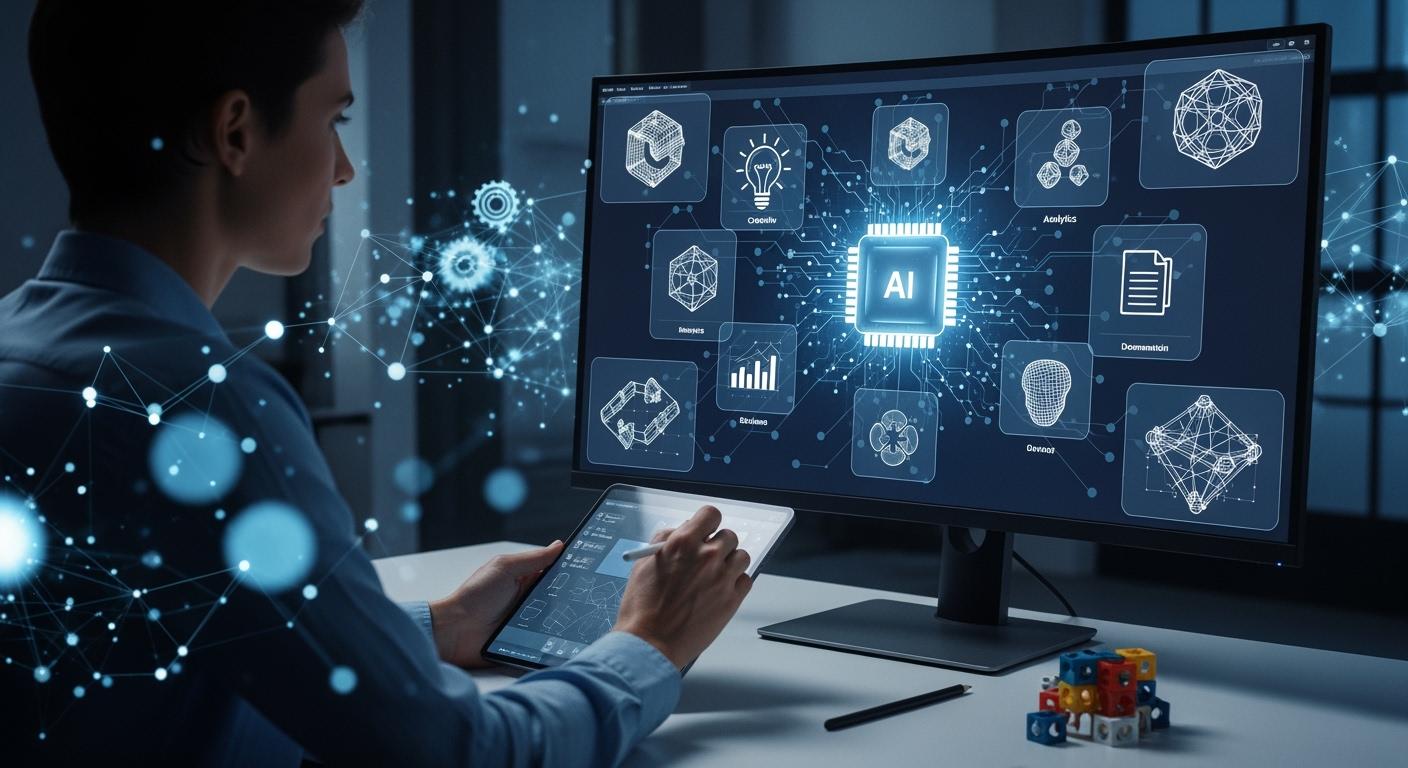
Generative ai changes how you approach product design. You can now automate tasks that once took hours, letting ai handle ideation, rapid prototyping, and even documentation. Many creative professionals have embraced ai tools. In fact, 83% of them now use ai in their daily work, and 66% rely on generative ai for better creative results. With ai, you can speed up product development and cut down development time by as much as 50%. Ai also helps teams work together, making collaboration smoother and boosting innovation across product development.
Generative AI in Product Design
Automating Ideation and Concepts
You can use generative ai to speed up the creation of product design concepts. AI tools help you generate flexible digital designs in moments. You see adaptive layouts and interfaces that adjust to user preferences and device characteristics. This ensures a seamless experience across phones, tablets, and computers. AI-driven design uses user behavior data to optimize content layout in real time. You can transform research insights into viable product ideas with the help of generative design tools. These tools create mockups for stakeholder review, reducing the time needed for manual design.
AI enhances creativity by automating repetitive tasks. You focus on complex aspects of ideation while AI handles the basics. You produce detailed mockups quickly, fostering collaboration between you and the AI. This partnership helps you explore more ideas and refine them faster.
Some popular tools for automating design concepts and layouts include:
- Adobe Sensei automates complex design tasks and boosts creativity.
- RunwayML lets you experiment with machine learning models.
- DeepArt transforms photos into artworks using deep learning.
- Artbreeder allows you to manipulate images with generative ai.
- GPT by OpenAI generates content for design concepts and marketing materials.
- Figma’s FigJam integrates AI for collaborative design processes.
Streamlining Prototyping and Iteration
Generative ai makes prototyping and iteration much faster. You can create many layout options, button styles, and color palettes based on design constraints and user data. Generative design tools let you test different animation styles and microinteractions almost in real time. You generate unique prototypes tailored to specific user segments.
Rapid visual ideation enables you to produce a multitude of design concepts quickly. You make decisions and validate ideas faster because AI generates options for you to review. Enhanced iteration gives you a dynamic and responsive design process. Generative ai analyzes user data to create personalized UI/UX designs, improving user engagement and allowing efficient production of design iterations.
Here is how generative ai streamlines prototyping and iteration:
- You produce many design concepts quickly.
- You make decisions and validate ideas faster.
- You iterate designs more dynamically.
Enhancing User Testing and Feedback
Generative ai helps you enhance user testing and collect customer feedback efficiently. You generate adaptive and flexible digital product designs that adjust to various screen sizes and user preferences. AI automates the creation of diverse design options, making brainstorming and prototyping easier. You analyze user data to create personalized UI/UX designs, which improves user engagement.
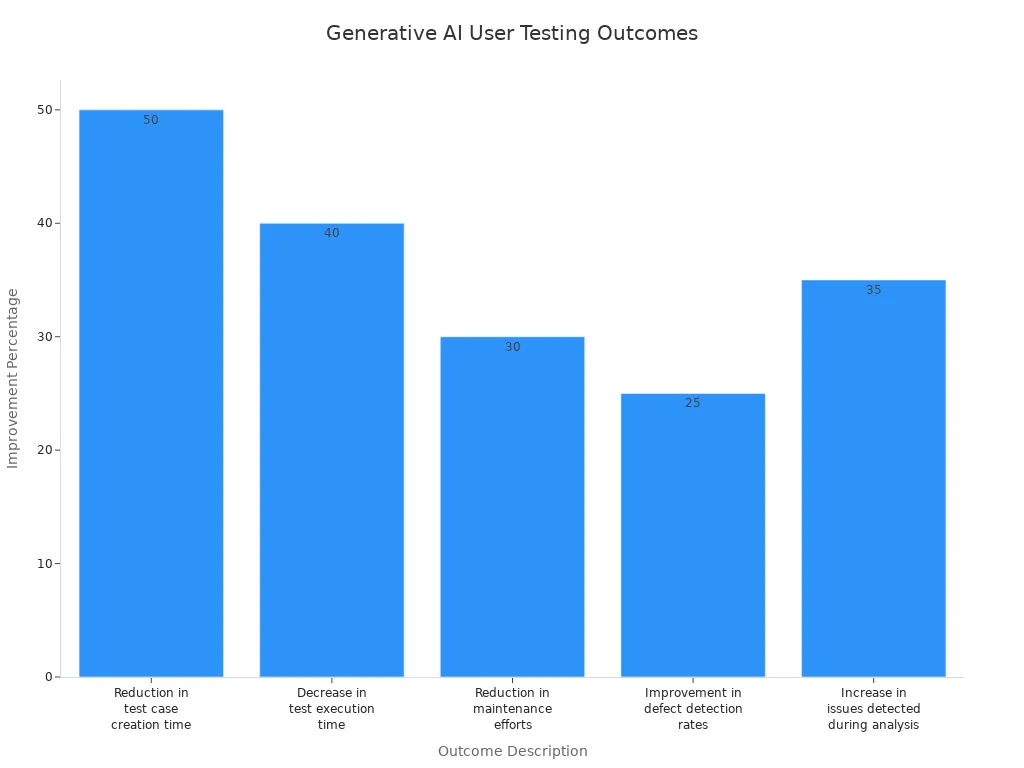
You see measurable outcomes when you use generative ai for user testing. The technology reduces test case creation time by 50%. Test execution time drops by 40%. Maintenance efforts decrease by 30%. Defect detection rates improve by 25%. You detect 35% more issues during analysis.
| Outcome Description | Improvement Percentage |
|---|---|
| Reduction in test case creation time | 50% |
| Decrease in test execution time | 40% |
| Reduction in maintenance efforts | 30% |
| Improvement in defect detection rates | 25% |
| Increase in issues detected during analysis | 35% |
Simplifying Documentation and Handoff
Generative ai simplifies documentation and handoff between design and engineering teams. You automate repetitive tasks, ensuring consistency and providing real-time updates. AI generates detailed specifications and predicts potential implementation issues. This improves collaboration and reduces errors. AI tools maintain design standards and suggest appropriate components, preventing costly mistakes.
You benefit from instant feedback on design decisions. AI suggests alternatives that align with both design and development needs. Seamless updates to designs happen without disrupting workflows. AI-powered tools automate repetitive tasks in design workflows. You generate documentation from design interactions and facilitate collaboration between design and development teams.
Here are some common AI-powered tools for automating design documentation:
| Tool Description | Functionality |
|---|---|
| AI tools for designers | Automate repetitive tasks and generate new ideas, including layout creation and code conversion. |
| AI documentation tools | Convert usage flows and UI interactions into structured content like tutorials and guides. |
| AI-powered product documentation tools | Streamline the creation of instructional content from design interactions. |
| Developer handoff automation tools | Analyze design files to extract key details and generate specifications without manual input. |
Tip: You can use ai in 3d modeling to create detailed documentation and handoff files, making the transition from design to engineering smoother.
AI-Powered Product Development Benefits
Speed and Workflow Efficiency
You can speed up your product development process with ai. Generative ai tools automate repetitive tasks, such as asset management and redlining. This means you spend less time on manual work and more time on creative thinking. Many teams see feedback cycles shrink from days to hours. You can move from idea to prototype much faster. In some cases, generative ai reduces product design time by up to 87%. Ai also helps you avoid mistakes by detecting bugs early and improving output quality. When you use ai, you shift from slow, static processes to agile, data-driven workflows.
Tip: Ai can optimize raw material use and reduce waste, which supports sustainability goals in product development.
Boosting Creativity and Innovation
You can boost creativity and spark innovation with ai-powered tools. Generative ai produces many layout options and styles based on user data. You can create unique prototypes for different user groups. Ai helps you test ideas quickly and find the best solutions. It also helps you overcome creative blocks by suggesting new directions. Designers use ai to spot accessibility issues and improve usability. In architecture and product design, you can visualize and simulate ideas instantly, saving time and resources.
Here are some innovative products developed with ai assistance:
| Product/Example | Description | Impact |
|---|---|---|
| Modular Designs | Designs that allow easy upgrades and repairs | Extends product lifespan, supports recycling |
| AI-Powered Generative Design (Airbus) | Lightweight, durable aircraft components | Reduces fuel use and costs |
| Personalized User Experience (Netflix) | User interface adapts to real-time data | Increases customer satisfaction |
| Customized EV Design (Yamaha) | Specialized electric vehicle designs | Meets diverse user needs |
Improving Team Collaboration
You can improve team collaboration with ai in product development. Ai tools enable real-time coordination, making handoffs between designers and developers smoother. Teams work together more efficiently because ai automates repetitive tasks and generates design options quickly. You can focus on creative solutions while ai handles the routine work. Companies like Citi, Eaton, and Boeing have seen faster development cycles and lower prototyping costs with ai integration.
Some platforms that support collaboration with ai include:
- Figma AI for automated layouts and design recommendations
- Canva AI for rapid concept exploration
- Uizard for turning sketches into wireframes
Ai also supports research by analyzing user behavior and feedback quickly. This leads to better decisions and higher product quality.
AI-Powered Simulation and Digital Twins
Predictive Design and Performance
You can use ai-powered simulation to transform how you approach product design. These tools let you create digital twins, which are virtual copies of real products or processes. With ai, you can predict production bottlenecks that traditional modeling might miss. You can schedule maintenance based on actual asset conditions, not just guesses. Machine learning algorithms in ai-powered simulation analyze data from digital twins. They find patterns and predict failures before they happen. This helps you improve performance engineering and avoid costly downtime.
You can test ideas virtually and see how products perform before building anything physical. Digital twins allow you to refine designs quickly. This leads to smarter and faster development. Ai-powered simulation gives you real-time analysis and optimization. You can make changes and see the impact right away. This process boosts performance engineering and helps you deliver better products.
Here are some ways ai-powered simulation and digital twins enhance your workflow:
- Predict production bottlenecks and schedule maintenance
- Analyze data to spot patterns and prevent failures
- Test and refine designs virtually before building prototypes
- Enable real-time optimization for better product performance
- Support performance engineering throughout the product lifecycle
You can see measurable improvements with ai-powered simulation. For example:
| Improvement Type | Percentage Improvement |
|---|---|
| Time to proficiency for new hires | 20–40% |
| Reduction in manager coaching time | 30–50% |
| Improvement in KPIs (sales conversion, CSAT, FCR) | 5–15% |
Ai-driven simulations also help you reduce design validation time by up to 50%. You can increase efficiency by 40% through predictive maintenance. In manufacturing, ai-powered simulation can double production output and reduce waste.
Optimizing Engineering Processes
You can use generative design and ai-powered simulation to explore many design options quickly. These tools automate different stages of development. You can integrate real-time user feedback and improve prototyping and testing. Generative design helps you maximize material use, which reduces waste and supports sustainability. This approach leads to more efficient and eco-friendly products.
Ai-powered simulation supports performance engineering by letting you analyze and optimize designs. You can improve manufacturing processes and factory efficiency. Digital twins help you make smart decisions about cost and sustainability. You can use different types of digital twins, such as 3D CAD models for products, simulations for manufacturing, and virtual models for factories.
Here is how generative design and ai-powered simulation optimize engineering processes:
- Rapidly generate multiple design options using user data
- Automate testing and bug fixing for quality assurance
- Optimize resource allocation and workflow management
- Enhance performance engineering with real-time simulation
You can use ai-powered simulation in many fields, including manufacturing, healthcare, smart cities, and retail. The main benefit is the ability to predict issues at any stage. This gives you insights into the current state and the entire lifecycle of your product. You can improve product design, manufacturing, and maintenance with these advanced tools.
Tip: Use ai-powered simulation and generative design to test ideas, reduce waste, and deliver high-quality products faster.
Implementing Generative AI in Teams
Tools and Platforms
You can choose from many ai tools and platforms to support product development. GitHub Copilot acts as a coding collaborator, suggesting functions and flagging vulnerabilities. Notion AI automates documentation and sprint retrospectives, which reduces administrative friction. Figma and Canva offer real-time collaborative design features, helping your team work together on projects. These platforms enable a streamlined design-to-app workflow, making it easier to move from concept to finished product. You can use ai-powered tools to support sustainable product design and improve data-driven workflows. Many teams benefit from the democratization of design, as ai tools make advanced features accessible to everyone.
Best Practices for Adoption
You can follow several best practices to integrate generative ai into your product design team:
- Identify use cases where ai provides the strongest return on investment, such as coding or customer engagement.
- Assess your data readiness. Make sure your systems handle unstructured data and comply with regulations.
- Choose models and tools that fit your product development needs.
- Separate approved and unapproved use cases to clarify which tasks can use public tools.
- Implement data sanitization to protect sensitive information.
- Ensure a human reviewer checks ai outputs before final decisions.
Tip: Train your team to use ai responsibly and encourage feedback to improve workflows.
Overcoming Challenges
You may face challenges when you adopt ai in product development. Data dependency and bias can affect ai models if you use poor-quality data. Ethical and privacy concerns arise when you rely on user data. Creativity constraints may appear because ai tools often generate repetitive designs. Limited context understanding makes it hard for ai to capture cultural and emotional nuances. Custom model training requires resources, which can be difficult for smaller teams. Maintenance and updates are necessary to keep ai models effective. Deployment can be complex and needs technical expertise. Scalability concerns may arise when you try to use tailored models across multiple projects.
Product design teams address quality control and data privacy by securing data pipelines and using techniques to prevent unauthorized access. You should maintain transparency and comply with regulations to build user trust. Human oversight ensures that ai outputs meet your standards and support real-time collaborative design.
You see generative ai changing product design by making your work faster and more creative. Many companies now use ai to boost innovation and create better customer experiences. You can launch products quickly, cut costs, and find new ideas with ai tools. Experts say your role will shift toward strategy and creative thinking as ai handles more tasks. The future of product design will focus on smart, data-driven solutions that help you stay ahead.
FAQ
What is generative AI in product design?
Generative AI uses algorithms to create design ideas, prototypes, and documentation. You can use it to automate tasks and speed up your workflow. It helps you explore more options and improve your designs.
How does generative AI improve creativity?
You get new ideas and styles from generative AI. It suggests layouts, colors, and features based on user data. You can break creative blocks and find fresh solutions faster.
Can generative AI replace designers?
Generative AI supports you but does not replace you. You make final decisions and add your creative touch. AI handles repetitive tasks so you can focus on strategy and innovation.
What are common challenges with generative AI?
You may face issues like data bias, privacy concerns, and limited context understanding. You need to check AI outputs and protect user data. Training your team helps you overcome these challenges.
Which tools help you use generative AI in product design?
You can use Figma, Canva, GitHub Copilot, and Notion AI. These tools automate design, coding, and documentation. They help you work faster and improve team collaboration.
See Also
The Role Of AI In Shaping Fast Fashion Trends
AI's Impact On Accelerating Market Readiness For Brands
Innovative AI Approaches To Sustainable Fashion Practices
Leveraging AI For Effective Brand Capacity Management
Using Machine Learning To Forecast Trends And Increase Revenue